Social media schedulers for every network
Pick a network to see how scheduling works there: limits, connection steps and tips. Every network shares the same calendar and AI composer.
LinkedIn post scheduler
Schedule LinkedIn posts to your profile, with AI rewrites and a live character count.
Read more →X (Twitter) scheduler
Schedule tweets and posts to X with images, a 280-character counter and AI rewrites.
Read more →Bluesky post scheduler
Schedule Bluesky posts with clickable links, hashtags and images, using an app password.
Read more →Mastodon scheduler
Schedule toots to any Mastodon server, including image posts with alt text.
Read more →Telegram channel scheduler
Schedule messages and photo albums to Telegram channels and groups with a bot.
Read more →Discord message scheduler
Schedule announcements to Discord channels with webhooks, including images.
Read more →Slack post scheduler
Schedule Slack announcements to channels from the same calendar as your social posts.
Read more →Instagram post scheduler
Schedule Instagram photos, carousels and Reels that publish automatically, no phone reminders.
Read more →Facebook post scheduler
Schedule posts, photo albums, videos and links to every Facebook Page you manage.
Read more →TikTok scheduler
Upload TikTok videos ahead and have them published automatically at the time you choose.
Read more →YouTube video scheduler
Upload YouTube videos and Shorts ahead, with the title and description written for you.
Read more →Threads scheduler
Schedule Threads posts with photos, videos and carousels next to X and Bluesky.
Read more →Pinterest pin scheduler
Schedule pins with a title, description and link to any of your Pinterest boards.
Read more →Reddit post scheduler
Schedule text, link and image posts to your Reddit profile, with the title written for you.
Read more →LinkedIn company page scheduler
Schedule posts to every LinkedIn company page you administer, next to your personal profile.
Read more →How does scheduling work on each network?
Every network exposes a different way for tools to publish on your behalf. LinkedIn and X use OAuth, the official “Sign in with…” flow, which hands Postuva a limited access token without ever showing it your password. Bluesky uses app passwords, separate revocable passwords made for tools. Mastodon servers issue access tokens from their Development settings. Telegram uses bots that you add to your channel as an admin, and Discord and Slack use webhooks that can only post into the one channel they were created for.
Once connected, every network behaves the same inside Postuva: it appears as an avatar in the composer, gets its own tab and character counter, shows up on the calendar, and is published by the same queue at the minute you choose. If a network rejects a post, you see that network's exact reason; if its access expires, the channel is flagged so you can reconnect without losing scheduled posts.
How do posting limits compare across networks?
Every network sets its own rules for length and media, and those rules shape what a good post looks like. X and Bluesky reward short, sharp posts; LinkedIn and Telegram leave room for a story or a full announcement. When you post one idea to several networks, the shortest limit decides how long a shared version can be, which is why Postuva keeps a separate version and counter for each network.
View as table
| Network | Characters |
|---|---|
| X (Twitter) | 280 |
| Bluesky | 300 |
| Threads | 500 |
| Mastodon | 500 |
| 600 | |
| Google Business Profile | 1,500 |
| Discord | 2,000 |
| 2,200 | |
| TikTok | 2,200 |
| 3,000 | |
| Telegram | 4,096 |
How do you connect each network?
Every method gives Postuva only the access it needs to publish. Official sign-ins never share your password; app passwords, tokens and webhooks can be revoked at any time without changing your password. Everything is encrypted with AES-256 before it's stored.
| Network | Connection method | What you need |
|---|---|---|
| LinkedIn and LinkedIn Pages | Official sign-in (OAuth) | Your LinkedIn login (Pages: admin of the page) |
| Facebook Pages | Official Facebook sign-in | Admin of the Page; every Page you pick becomes a channel |
| Official Instagram sign-in | A Business or Creator account | |
| Threads | Official Threads sign-in | Your Threads account |
| TikTok | Official TikTok sign-in | Your TikTok account |
| YouTube | Google sign-in | A Google account with a YouTube channel |
| Official Pinterest sign-in | At least one board; each board becomes a channel | |
| Official Reddit sign-in | Your Reddit account (posts go to your profile) | |
| X (Twitter) | Official sign-in (OAuth 2.0) | Your X login |
| Bluesky | App password | Handle + app password from Bluesky settings |
| Mastodon | Access token | Server address + token from Development settings |
| Telegram | Bot | Bot token from @BotFather, bot added as channel admin |
| Discord | Webhook | Webhook URL from the channel's Integrations settings |
| Slack | Incoming webhook | Webhook URL from a Slack app |
One calendar for every network
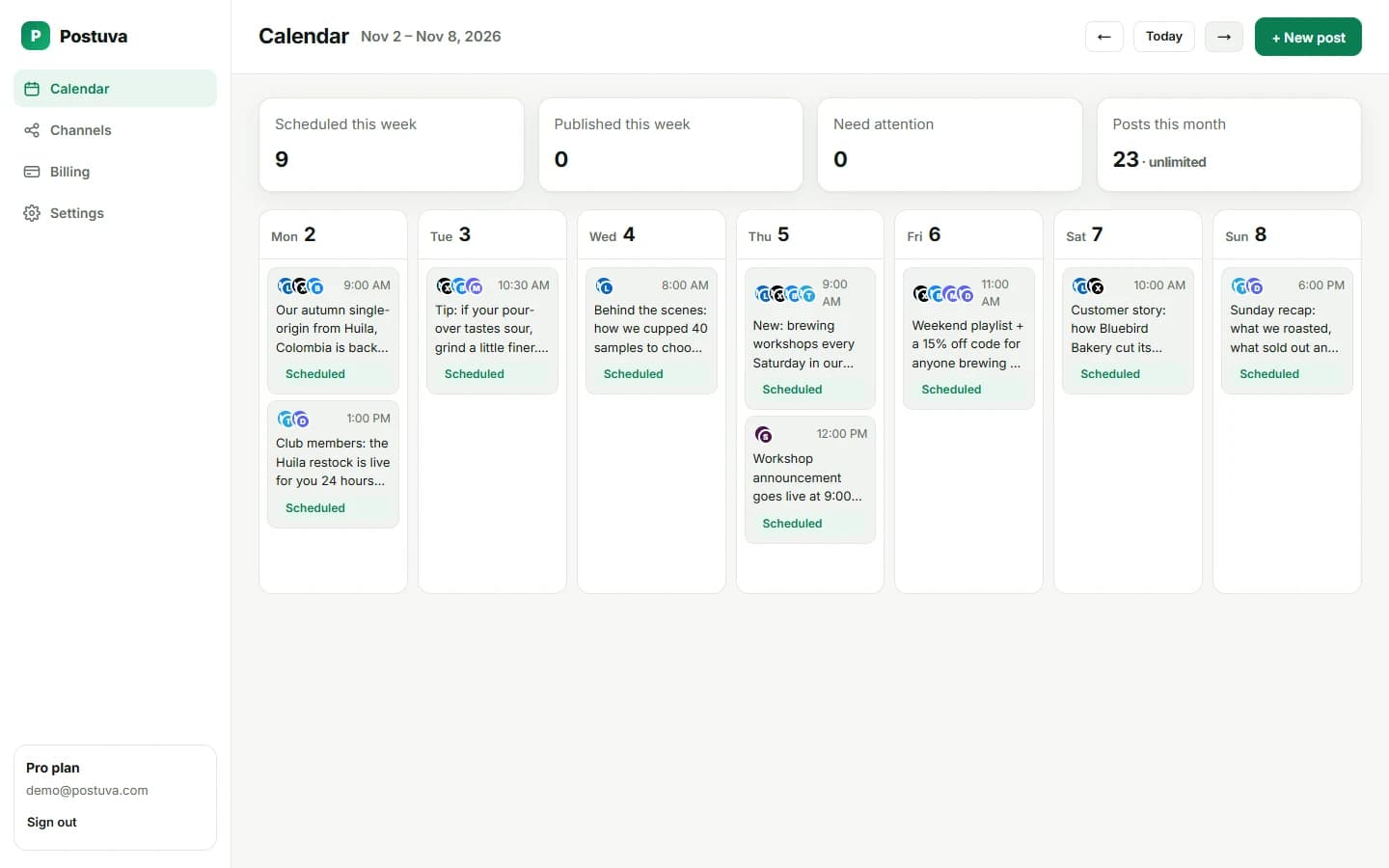
Each network has its own app and, sometimes, its own built-in scheduler. Using them separately means five places to check and five ways to forget something. Postuva puts every network on one weekly calendar, so you can see at a glance what goes out where and when, and spot the day you forgot.
New networks are added regularly. Facebook Pages, Instagram, Threads, LinkedIn Pages, TikTok, YouTube, Pinterest and Reddit are next, and the Channels page in the app shows what's coming.
Which networks should you schedule to?
Most people get the best return from two public networks plus one owned channel. A B2B founder might pick LinkedIn and X plus a Telegram channel; a developer tool might pick X and Bluesky plus a Discord server. Start there, build a rhythm, and add networks once the first ones run smoothly.
| Network | Best for | Post style |
|---|---|---|
| B2B, careers, professional services, founders | Stories and lessons, 3–15 short paragraphs | |
| Consumer brands, creators, local businesses | Photos, carousels and Reels with a strong first line | |
| Facebook Pages | Local businesses and communities | Updates, photos, events and questions |
| TikTok | Reaching new audiences with short video | Vertical video with a hook in the first second |
| YouTube | Tutorials, demos and long-lived search traffic | Video with a searchable title |
| Threads | Conversation on Meta's text network | Short, conversational posts |
| Products, recipes, design, how-tos | A strong image with a descriptive title and link | |
| X (Twitter) | Real-time conversation, tech, media, founders | Short, punchy, one idea per post |
| Bluesky | Tech, science, creative and journalism communities | Conversational, under 300 characters |
| Mastodon | Open-source, privacy-minded and niche communities | Friendly, CamelCase hashtags, alt text |
| Telegram | Owned audiences, communities, international markets | Announcements, digests, photo albums |
| Discord | Product communities, gaming, creators' fans | Community updates and events |
| Slack | Your team, partners, community workspaces | Internal launch coordination |
Scheduling best practices that apply everywhere
- Post when your audience is online, in their timezone, not yours.
- Adapt the format to each network rather than pasting the same text.
- Keep a steady rhythm; consistency beats bursts on every network.
- Schedule a week ahead so busy days don't break the streak.
- Show up after posting: replies in the first hour drive reach.
- Watch for failures: expired access is the most common cause of missed posts.
Frequently asked questions about scheduling
- Is it safe to connect my accounts? Yes. Postuva uses each network's official connection method and encrypts every credential with AES-256.
- What if a network is down when my post is due? Temporary errors are retried after 1, 5 and 30 minutes.
- Can I schedule to several accounts on one network? Yes, each account is its own channel.
Can I schedule to a network that isn't listed?
Probably not yet, but the list keeps growing. Postuva already covers 23 networks, including blogs (WordPress, DEV, Hashnode), newsletters (Listmonk), local search (Google Business Profile) and decentralised networks (Bluesky, Mastodon, Nostr, Lemmy). The Channels page in the app marks the rest of the roadmap as coming soon. Networks are prioritised by demand, so email support@postuva.com to tell us which one you need.