Post to multiple social media platforms at once
To post to several social networks at once, select the channels in Postuva's composer, write your post and press Publish now or Schedule. Each network's character limit is checked separately, and you can give any network its own text, or let AI adapt it, before it goes out.
Why not post the exact same text everywhere?
Each network has different limits and habits. A 1,200-character LinkedIn story doesn't fit X's 280 characters, and hashtags that help on LinkedIn look out of place in a Discord announcement. Cross-posting works best when the message is the same but the format fits each network.
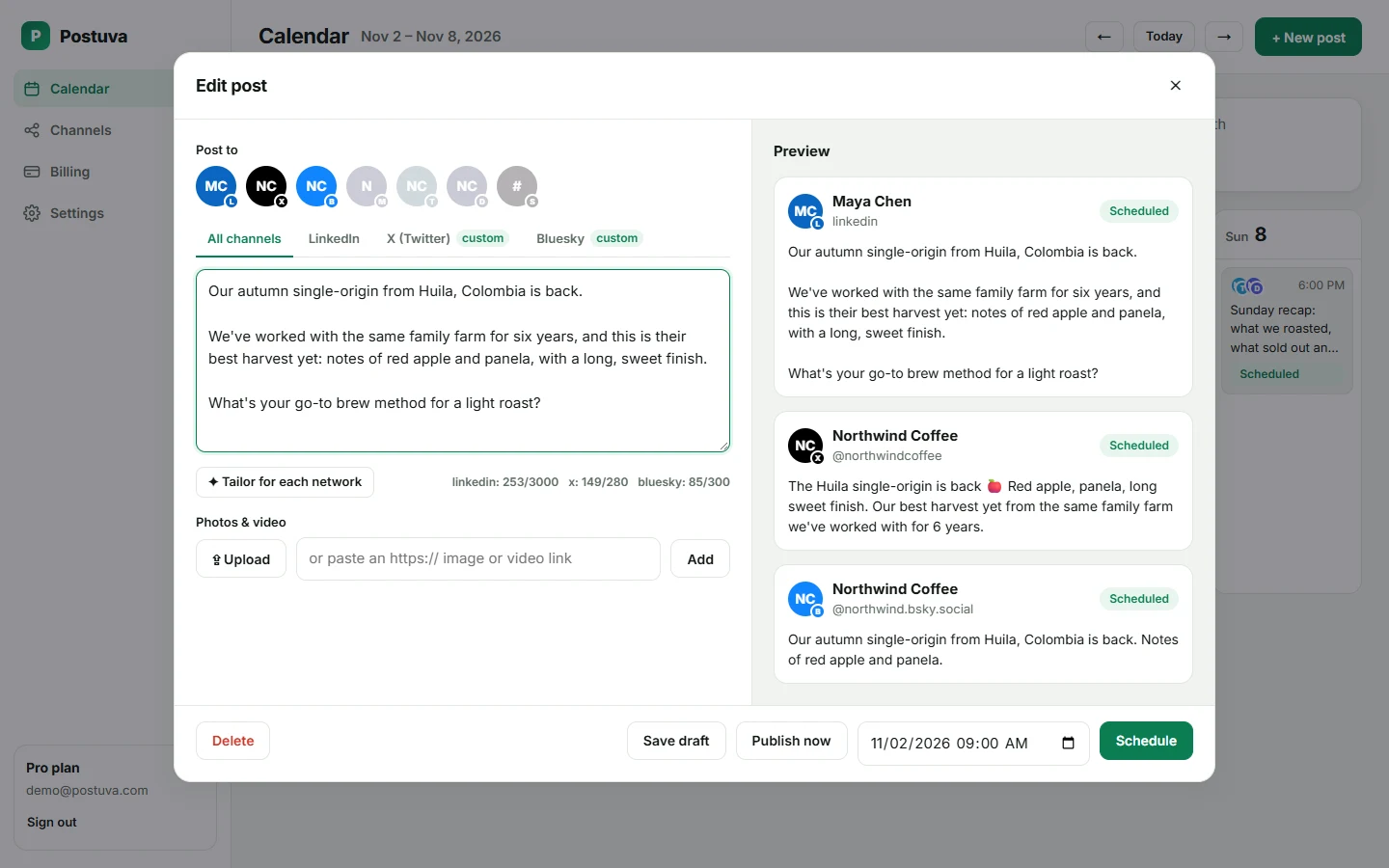
Watch a cross-post being scheduled
Real recording: three networks selected, one idea written, each version checked in its own tab, then scheduled.
Character limits by network
| Network | Limit | Images |
|---|---|---|
| X (Twitter) | 280 | 4 |
| Bluesky | 300 | 4 |
| Mastodon | 500 (default) | 4 |
| Discord | 2,000 | 10 |
| 3,000 | 9 | |
| Telegram | 4,096 (1,024 with a photo) | 10 |
View as table
| Network | Characters |
|---|---|
| X (Twitter) | 280 |
| Bluesky | 300 |
| Threads | 500 |
| Mastodon | 500 |
| 600 | |
| Google Business Profile | 1,500 |
| Discord | 2,000 |
| 2,200 | |
| TikTok | 2,200 |
| 3,000 | |
| Telegram | 4,096 |
Image limits by network
Images are where cross-posting most often goes wrong: four images are fine everywhere, but ten will be refused by X and Bluesky. Postuva checks image counts for each selected network before scheduling.
View as table
| Network | Images |
|---|---|
| 1 | |
| Google Business Profile | 1 |
| X (Twitter) | 4 |
| Bluesky | 4 |
| Mastodon | 4 |
| 9 | |
| 10 | |
| Threads | 10 |
| Facebook Pages | 10 |
| Telegram | 10 |
Cross-posting best practices
- Keep the core message identical so your brand is consistent everywhere.
- Adapt the opening line: hooks on X, stories on LinkedIn, questions on Bluesky.
- Use hashtags only where they're customary (LinkedIn, Mastodon, Bluesky feeds).
- Stagger by an hour or two if your audiences are active at different times.
- Reply on each network; engagement drives reach everywhere.
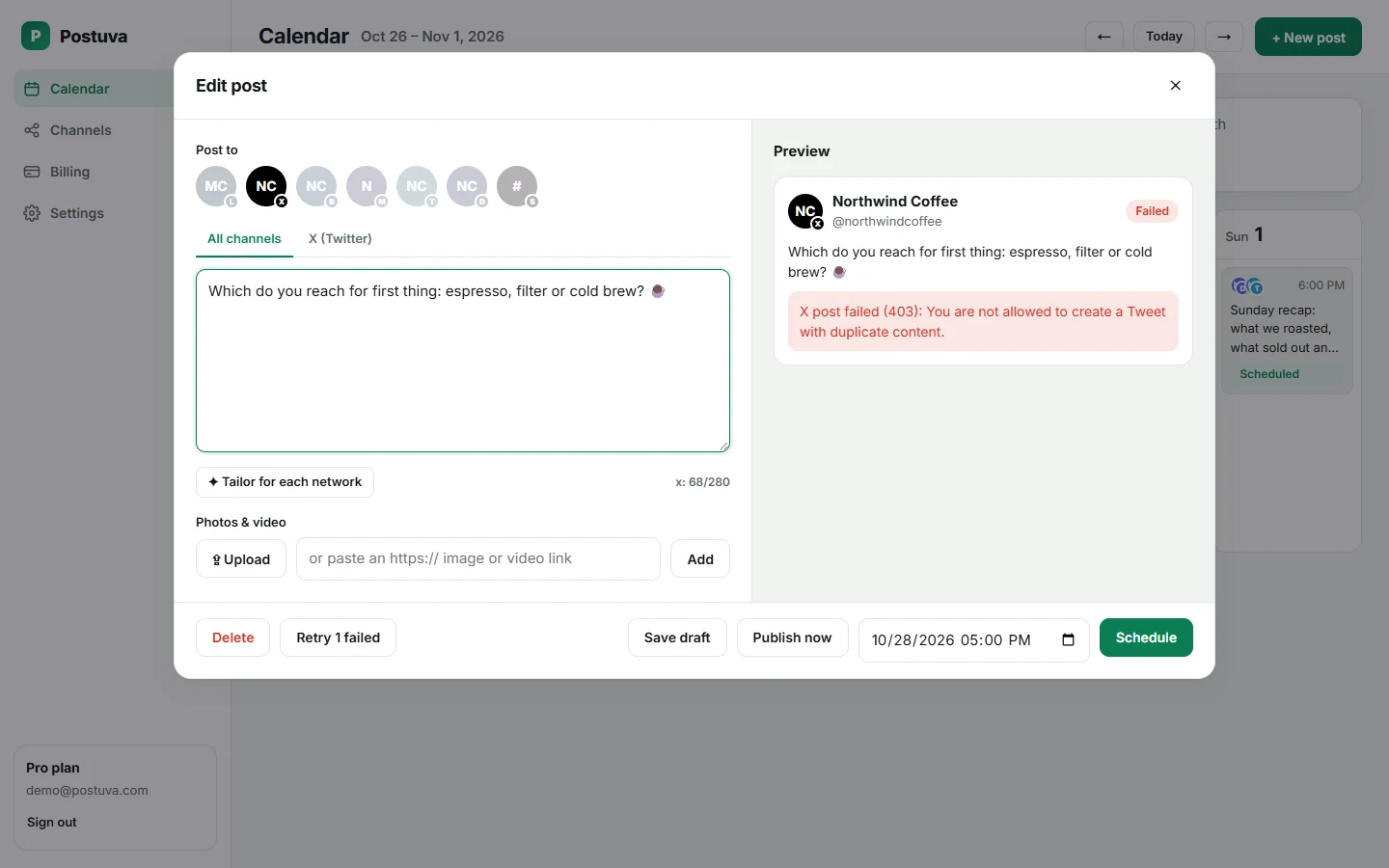
What happens if one network fails?
Each network's post is independent. If X refuses a post but LinkedIn and Bluesky accept it, the two successes stay published and only the X version is marked failed, with X's exact reason. Fix the issue and retry just that version; there's no risk of double-posting to the networks that already worked.
Worked example: one announcement, five networks
All five come from one idea in one post. The shared text is written once; LinkedIn and Telegram get longer versions in their own tabs, and the rest use the shared text or an AI-tailored version.
| Network | Version | Length |
|---|---|---|
| Story: why we built it, who it helps, a question | ~900 characters | |
| X | Hook + link | ~200 characters |
| Bluesky | Conversational version + link | ~250 characters |
| Telegram | Full announcement + product photo | ~600 characters |
| Discord | Community update with a thank-you to testers | ~400 characters |
Cross-posting vs reposting vs syndicating
Cross-posting natively, rather than sharing a link to your post on another network, gives each audience the full post in a format their network shows well. That's why Postuva publishes a native post on each network instead of linking between them.
| Term | What it means | When to use it |
|---|---|---|
| Cross-posting | Publishing the same idea natively on several networks | Announcements, tips, updates |
| Reposting | Sharing someone else's post (or your own) within one network | Amplifying on the same network |
| Syndicating | Republishing long-form content (articles) on other platforms | Blogs and newsletters |
How networks treat cross-posted content
Networks rank posts on how people engage with them on that network. A post that reads naturally there (the right length, tone and format) gets better engagement than an obvious copy from elsewhere. Avoid cross-network clutter such as “@mentions” that don't exist on the other network, or hashtags that only mean something on one platform. Tailoring handles most of this automatically, and the per-network tabs let you fix the rest.
Cross-posting checklist
- Each selected network's counter is green.
- Image count fits the strictest network you selected.
- No network-specific @mentions in the shared text.
- Hashtags only where they're customary.
- The time suits every audience, or each version is staggered.
Cross-posting for teams and agencies
For teams, cross-posting from one composer also means one approval and one record. Instead of three people each posting the announcement in a different app, one person writes it, a colleague reviews each network's tab, and the whole set is scheduled together. For agencies, each client's workspace keeps cross-posts inside that client's channels, so one client's news can never land on another client's account.
Frequently asked questions
Does cross-posting hurt reach?
Posting the same idea on different networks is normal practice. Adapting the format to each network is what keeps engagement high.
Can I post to two accounts on the same network?
Yes, connect both and select both.
Is cross-posting free?
Yes, on the free plan you can cross-post to up to 3 channels.
Can I post to multiple platforms at once from my phone?
Postuva works in a mobile browser, including the composer and calendar.
Does each network count as a separate post?
Yes, a post sent to three networks counts as three scheduled posts toward your plan's monthly limit.
Which networks can I cross-post to?
X, LinkedIn, Facebook, Instagram, Threads, TikTok, YouTube, Pinterest, Reddit, Tumblr, Bluesky, Mastodon, Nostr, Lemmy, Telegram, Discord, Slack, WordPress, DEV, Hashnode, Google Business Profile and Listmonk, plus LinkedIn company pages.
Can I cross-post a link?
Yes. Links work on every network; X counts each link as 23 characters whatever its length.