Schedule TikTok videos ahead of time
To schedule TikTok videos with Postuva, connect your TikTok account with TikTok's official sign-in, upload a vertical MP4 video, write a caption of up to 2,200 characters and pick a date and time. Postuva sends the video to TikTok at that minute through TikTok's Content Posting API.
- Format
- One vertical video per post (9:16)
- Caption limit
- 2,200 characters
- Connection
- TikTok's official sign-in
- Native TikTok scheduling
- Desktop only, up to 10 days ahead
- Price
- Free for 3 channels
Can you schedule posts on TikTok?
Yes, in two ways. TikTok's own scheduler, on the desktop website, lets you schedule a video between 15 minutes and 10 days ahead. It doesn't exist in the mobile app, it only covers TikTok, and anything further out than ten days has to wait.
A scheduling tool like Postuva uses TikTok's official Content Posting API instead. You can plan weeks of videos on one calendar, next to the Instagram Reels, YouTube Shorts and LinkedIn posts you make from the same footage.
| TikTok's own scheduler | Postuva | |
|---|---|---|
| Schedule TikTok videos | Yes, desktop only | Yes, any browser |
| How far ahead | Up to 10 days | No limit |
| Same video to Reels and Shorts | No | Yes |
| AI caption help | No | Yes |
| Calendar of all networks | No | Yes |
How do I schedule a TikTok video with Postuva?
- Connect TikTok. Open Channels and press Connect next to TikTok. TikTok's sign-in opens in a pop-up; approve access for Postuva.
- Upload the video. Press New post and upload a vertical MP4 or MOV. TikTok accepts videos from 3 seconds to 10 minutes; 1080 × 1920 looks best.
- Write the caption. Write the caption with a few hashtags, or press Tailor for each network to have AI write a TikTok caption next to versions for Reels and Shorts.
- Pick a time and schedule. Choose when it should go live and press Schedule. Postuva uploads the video to TikTok at that time.
What videos does TikTok accept?
TikTok accepts MP4, MOV and WebM files, ideally vertical 9:16 at 1080 × 1920 pixels with H.264 video and AAC audio. Videos can be from 3 seconds up to 10 minutes through the API, but short videos remain TikTok's core format: 15 to 60 seconds is the sweet spot for most accounts.
TikTok's licensed music library and effects are only available inside the TikTok app, so add music and text overlays in your editor before uploading. Original audio, voice-over and royalty-free music you have the rights to all work.
Who can see scheduled TikTok videos?
TikTok decides which privacy options each account may use and enforces them on its side. Postuva asks TikTok for the account's allowed options and uses the most public one available, usually “Everyone”. Accounts set to private in TikTok post to followers only.
TikTok also reviews every app that posts publicly on behalf of users. Until a new integration has passed that review, TikTok publishes its videos as private (visible only to the creator). Check the post's visibility in the TikTok app; you can change it to public there with one tap.
How often should I post on TikTok?
TikTok rewards consistency more than any other network: accounts that post three to five times a week tend to grow faster than ones that post daily for a week and then disappear. Batch-filming once a week and scheduling the results is the most reliable way to keep that rhythm.
The same vertical video usually works on Instagram Reels and YouTube Shorts too. Select all three channels when you schedule and each network gets its own caption, so one filming session fills three feeds.
View as table
| Network | Posts a week |
|---|---|
| 2–3 | |
| 3–4 | |
| TikTok | 3–5 |
| 3–5 | |
| Bluesky | 5–7 |
| X (Twitter) | 7–21 |
What happens if a scheduled TikTok post fails?
Networks refuse posts for a handful of reasons: an expired connection, media in a format they don't accept, a caption over the limit or a temporary outage on their side. Postuva handles each one differently. Temporary errors (timeouts, rate limits, the network being down) are retried automatically after one minute, five minutes and thirty minutes. Permanent errors are not retried, because sending the same broken request again only wastes time.
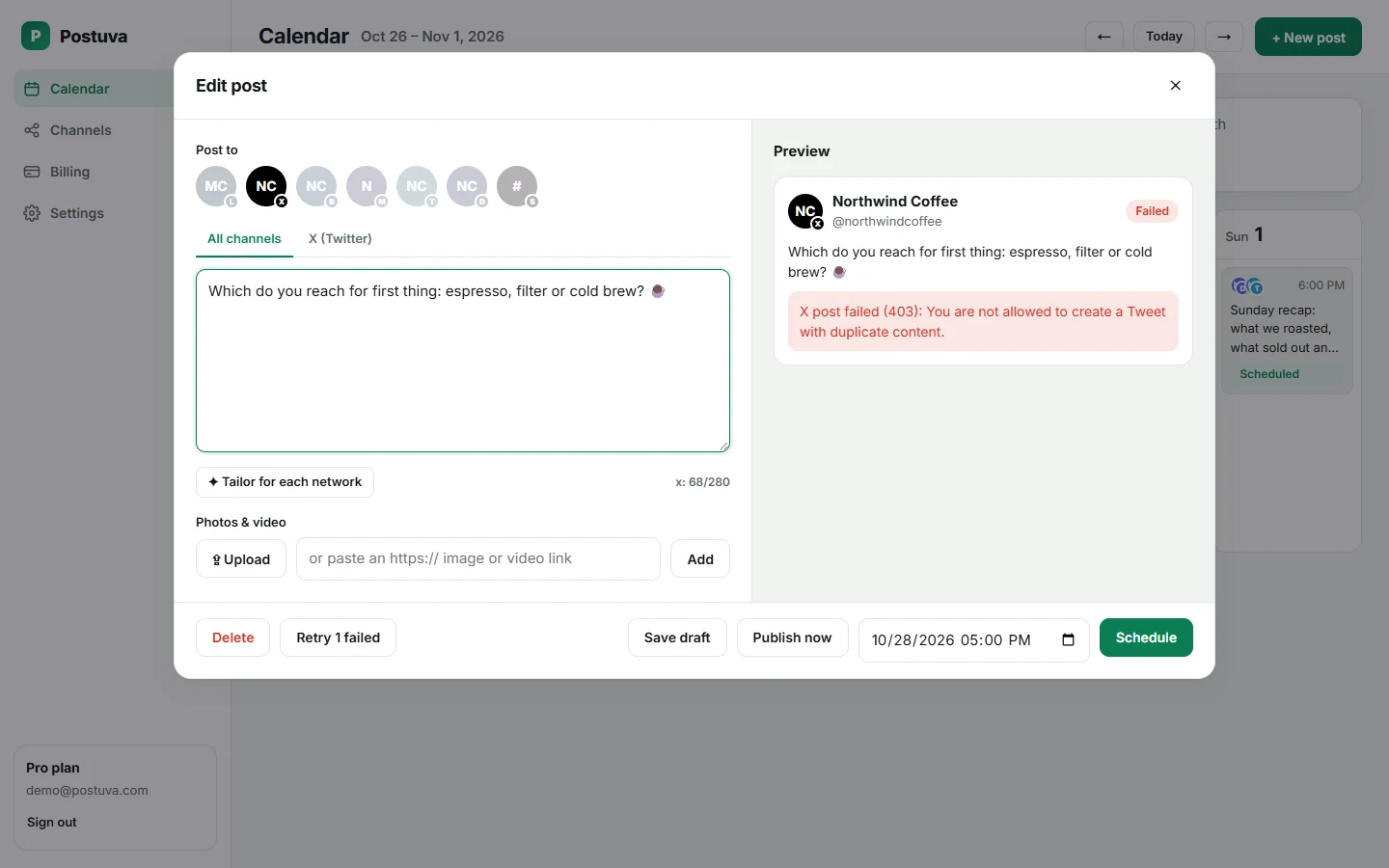
When a post can't be published, it turns red on the calendar and shows TikTok's exact error message, not a vague “something went wrong”. If TikTok's access has expired, the channel shows a Reconnect button. Fix the cause, press Retry and the post goes out straight away.
Is it safe to connect TikTok to Postuva?
Yes. Postuva connects through TikTok's official sign-in, which opens in a small pop-up window on TikTok's own website. You approve exactly what Postuva may do there; Postuva never sees your password. The access token TikTok returns is encrypted with AES-256-GCM before it's stored, and it's only decrypted at the moment a post is published.
You can disconnect at any time, either from Postuva's Channels page or from TikTok's Settings → Security → Manage app permissions. Disconnecting deletes the stored token immediately. Posts already published stay on TikTok; scheduled posts for that channel stop.
How much does it cost to schedule TikTok posts?
The free plan includes 3 channels, 30 scheduled posts a month and 20 AI rewrites, with no time limit and no card. That's enough to schedule TikTok alongside two other networks and see whether planning ahead works for you.
Paid plans start at $15 a month (Creator: 10 channels, unlimited posts, 300 AI rewrites). Pro at $29 adds approvals, extra workspaces and team members, and Agency at $79 covers 150 channels for client work. Yearly billing gives you two months free. Every plan includes every network, so TikTok never costs extra.
Frequently asked questions
Can I schedule TikTok videos for free?
Yes. Postuva's free plan includes 3 channels and 30 scheduled posts a month, including TikTok.
Can I schedule TikTok photo carousels?
Not yet. Postuva schedules TikTok videos; photo mode posts are on the roadmap.
Can I add TikTok sounds to a scheduled video?
No. TikTok's licensed sounds are only available in the TikTok app. Add your own audio before uploading.
Will scheduled TikToks get less reach?
TikTok treats videos posted through its official API like videos uploaded in the app. Reach depends on the video and how people react to it.