How to schedule tweets (posts on X)
To schedule a tweet, open x.com on a computer, click Post, write your post, click the calendar icon (Schedule) under the text box, choose a date and time, click Confirm and then Schedule. Scheduled posts are listed under Unsent posts → Scheduled.
How to schedule a post on X
- Open x.com. Scheduling is available in the web composer.
- Write the post. Stay within 280 characters on a standard account.
- Click Schedule. The calendar icon under the text box.
- Choose date and time. Click Confirm.
- Schedule. Click Schedule. Edit it later from Unsent posts → Scheduled.
Can I schedule tweets on the X mobile app?
Scheduling options in the mobile app are limited and vary. The web composer or a scheduler is the dependable option.
Schedule X together with LinkedIn and Bluesky
If you post the same update on several networks, Postuva's X scheduler puts them on one calendar and uses AI to fit the X version into 280 characters.
View as table
| Network | Characters |
|---|---|
| X (Twitter) | 280 |
| Bluesky | 300 |
| Threads | 500 |
| Mastodon | 500 |
| 600 | |
| Google Business Profile | 1,500 |
| Discord | 2,000 |
| 2,200 | |
| TikTok | 2,200 |
| 3,000 | |
| Telegram | 4,096 |
Writing tweets worth scheduling
A scheduled post has to stand on its own, because you won't be there to add context in real time. Good scheduled posts are evergreen or clearly time-stamped: a tip, a lesson, a question, a link with your take on it. Avoid scheduling replies to news that might change before the post goes out.
- Front-load the value: the first eight words decide everything.
- One idea per post; save the rest for tomorrow.
- Use line breaks for readability on mobile.
- Add an image when it explains faster than words.
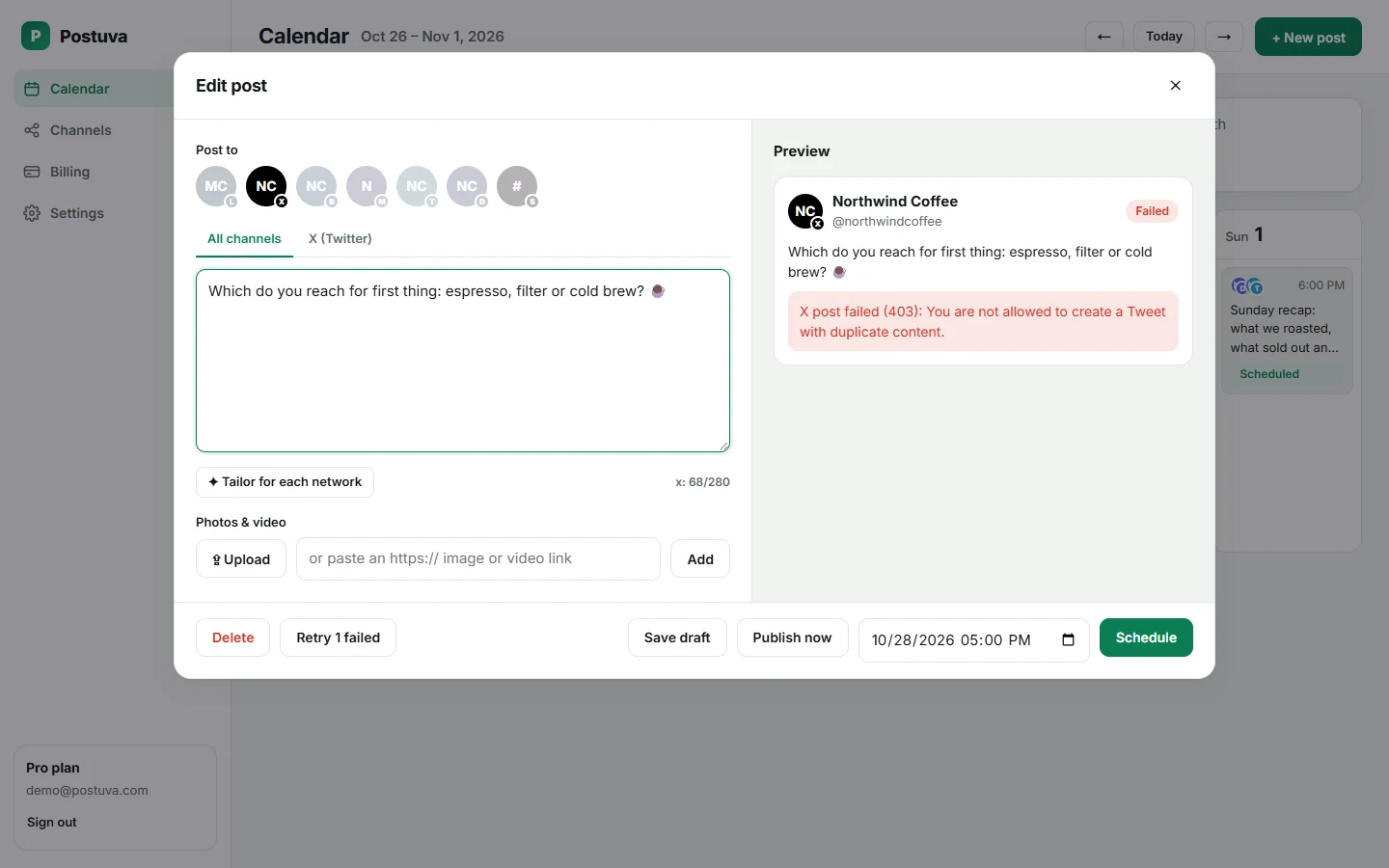
- Never schedule the same text twice; X rejects duplicates.
How to plan a week of posts on X
Ten posts a week sounds like a lot, but written in one sitting and scheduled, it takes about an hour. Reuse the strongest ones on Bluesky and LinkedIn with the composer's per-network tabs.
| Day | Morning | Afternoon |
|---|---|---|
| Monday | Lesson from last week | Question to your audience |
| Tuesday | Practical tip | Link with your take |
| Wednesday | Behind the scenes | Mini case study |
| Thursday | Opinion | Resource roundup |
| Friday | Weekly recap | Lighter post or meme |
Native X scheduling vs a scheduler
| x.com composer | Postuva | |
|---|---|---|
| Schedule single posts | Yes | Yes |
| Works with other networks | No | Yes, 23 networks |
| Calendar view | No (list only) | Yes |
| AI fit to 280 characters | No | Yes |
| Failure alerts with the reason | No | Yes |
How do you see and edit scheduled posts on X?
In Postuva, scheduled posts appear on the calendar; click one to edit, reschedule or delete it across every network at once.
- Open the composer. Click Post on x.com.
- Open Unsent posts. Click Drafts or Unsent posts at the top of the composer.
- Switch to Scheduled. Select the Scheduled tab to see everything waiting.
- Edit or delete. Click a post to change its text or time, or delete it.
How to schedule tweets with Postuva
- Connect X. Channels → X (Twitter) → approve access on x.com.
- Write the post. Click New post, write your text and watch the 280-character counter.
- Add networks. Select Bluesky, LinkedIn or others to post the same idea there.
- Add images. Up to 4 images by link.
- Schedule. Choose the time and press Schedule; it appears on your calendar.
Should you schedule tweets at all?
Some people worry that scheduled posts feel less authentic. In practice, readers can't tell how a post was published; they notice whether it's useful and whether you reply. Scheduling handles the consistent part (tips, lessons, updates) so your live time goes to conversations, which is the most authentic part of being on X.
Scheduling tweets across time zones
If your audience spans regions, schedule your most important posts twice in a week at different times rather than posting the identical text twice in a day. X rejects exact duplicates, so vary the wording. For example, post a tip as a question for the European morning and as a statement for the American afternoon. Check which version did better and learn from it.
Remember that scheduled posts publish in the time zone shown by your tool. Postuva shows times in your browser's time zone and lets you set a timezone per workspace for teams working across regions.
Frequently asked questions
Can I schedule threads on X?
Threads can't be scheduled from the X composer. Third-party tools that support threads can schedule them.
Is scheduling tweets free?
Yes, natively on x.com, and on Postuva's free plan.
How far ahead can you schedule a tweet?
X's composer lets you schedule well into the future (more than a year ahead at the time of writing). Postuva has no limit.
Why did my scheduled tweet not post?
Common reasons are duplicate text, revoked access or going over the character limit. Postuva shows the exact reason X gives.
Can I schedule tweets with images?
Yes. Both x.com and Postuva let you attach up to 4 images to a scheduled post.
Can I schedule tweets from the X mobile app?
Options in the mobile app are limited. The web composer at x.com or a scheduler works reliably.
Can I schedule a tweet with a poll?
X's own composer supports some scheduled content types that third-party tools may not; Postuva schedules text and image posts.
What time zone do scheduled tweets use?
On x.com, your device's time zone. In Postuva, the calendar shows times in your browser's time zone.
Can I schedule tweets to several accounts?
Yes. Connect each X account as a channel in Postuva and select the ones you want.