How to schedule posts on LinkedIn
To schedule a LinkedIn post, click Start a post, write it, then click the clock icon next to Post, choose a date and time up to three months ahead, click Next and then Schedule. To schedule LinkedIn together with X, Bluesky and other networks, use a scheduler like Postuva.
How do I schedule a post on LinkedIn natively?
- Start a post. On your LinkedIn home page click Start a post.
- Write it. Add text, images or a document.
- Click the clock icon. It sits next to the Post button.
- Pick date and time. Choose when it should go out, then click Next.
- Schedule. Click Schedule. View scheduled posts from the clock icon → View all scheduled posts.
LinkedIn's scheduler vs a social media scheduler
| LinkedIn's clock icon | Postuva | |
|---|---|---|
| Schedule a profile post | Yes | Yes |
| How far ahead | About 3 months | No limit |
| Same idea to X, Bluesky and others | No | Yes |
| AI version for LinkedIn's style | No | Yes |
| Week calendar view | No | Yes |
| Cost | Free | Free for 3 channels |
How do I schedule LinkedIn with other networks?
Connect LinkedIn in Postuva's LinkedIn scheduler, select it together with X, Bluesky or your community channels, let AI tailor each version, and schedule them all at once.
When is the best time to post on LinkedIn?
For most B2B audiences, weekday mornings and lunchtimes in the audience's timezone work well. Test two time slots over two weeks and keep the one with more impressions.
View as table
| Network | Posts a week |
|---|---|
| 2–3 | |
| 3–4 | |
| TikTok | 3–5 |
| 3–5 | |
| Bluesky | 5–7 |
| X (Twitter) | 7–21 |
How to write a LinkedIn post people read
- Hook. One line that makes people click “see more”: a number, a surprising outcome or a strong opinion.
- Context. Two or three short lines on the situation.
- Insight. What you learned or what the reader should do differently.
- Proof. An example, a result or a short story.
- Question. End with something easy to answer in a comment.
Common LinkedIn scheduling mistakes
- Scheduling and disappearing: reply to comments in the first hour.
- Posting the same text as on X: LinkedIn readers expect more context.
- Too many hashtags: two or three relevant ones are plenty.
- Links in the first line: lead with value, put the link near the end.
- Posting at night: weekday working hours work best for most B2B audiences.
Worked example: a LinkedIn post, start to schedule
Idea: “We cut our support response time from 9 hours to 2 by changing one thing.”
Draft: “We cut support response time from 9 hours to 2. The change wasn't a new tool. We stopped batching tickets and started answering the oldest one first, every time. It felt slower for a week. Then the backlog disappeared. What's one small process change that paid off for your team?”
Schedule: Tuesday at 08:30 in the audience's timezone, alongside a shorter X version in the same post. Then block 15 minutes at 08:30 to reply to comments.
Personal profile or company page?
Posts from people usually reach far more than posts from company pages, because LinkedIn's feed favours individuals. Many businesses get the best results by having founders and team members post regularly, with the company page sharing announcements. Postuva schedules personal profiles today, with LinkedIn Pages coming next.
How to schedule LinkedIn posts with Postuva
- Connect LinkedIn. Channels → LinkedIn → sign in with LinkedIn and approve.
- New post. Open the calendar and click New post, or click a day.
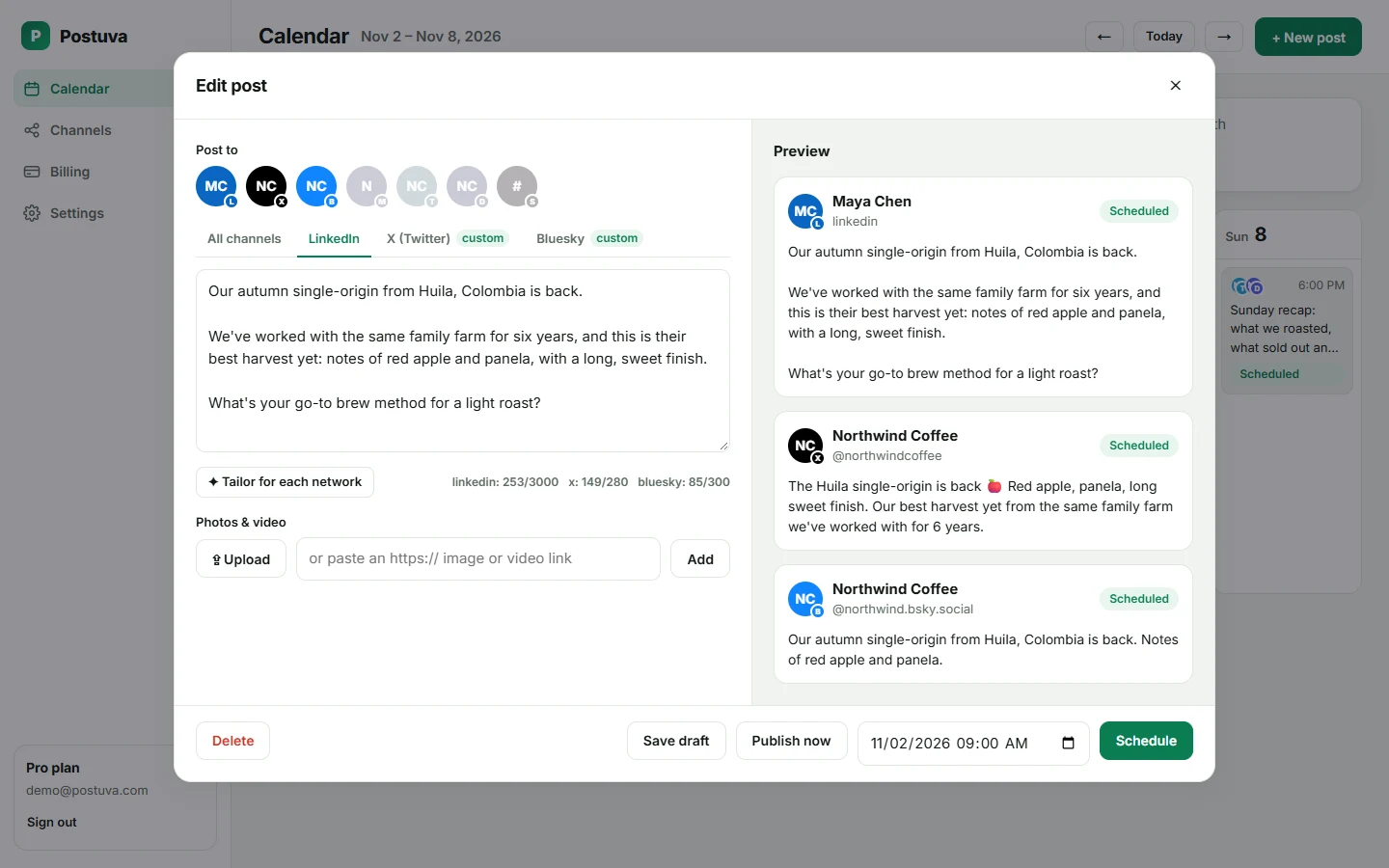
- Write and tailor. Write the idea, select LinkedIn plus any other networks, and use Tailor for each network if you want.
- Check the LinkedIn tab. Make sure the hook is in the first two lines and the counter is under 3,000.
- Schedule. Pick the date and time and press Schedule.
LinkedIn scheduling for teams
When several people post about the same company news, stagger them rather than posting at the same minute: the company page first, then the founder an hour later, then team members through the day. Each post reaches a different network of connections, and spreading them out keeps the topic in people's feeds for longer.
Frequently asked questions
Can I schedule LinkedIn posts on mobile?
Yes, the LinkedIn app has the same clock icon in the post composer.
Can I schedule LinkedIn articles?
Articles and newsletters can be scheduled from the article editor's publish options.
Can I schedule LinkedIn carousels (PDF posts)?
LinkedIn's native scheduler supports document posts; Postuva currently schedules text and image posts.
Does LinkedIn reduce reach for scheduled posts?
There's no evidence of that. Posts made through LinkedIn's official API appear like any other post.
Can I schedule LinkedIn posts for free?
Yes, natively with the clock icon, or with Postuva's free plan to schedule LinkedIn together with other networks.
Why can't I see the clock icon on LinkedIn?
Scheduling may not be available for some post types, and the icon can be hidden on narrow screens. Try the desktop site with a standard text or image post.
Can I schedule LinkedIn posts with images?
Yes, natively and in Postuva (up to 9 images).
Can I edit a scheduled LinkedIn post?
Yes. In LinkedIn open the clock icon → View all scheduled posts; in Postuva click the post on the calendar.
How many LinkedIn posts can I schedule?
LinkedIn doesn't publish a strict limit for normal use. In Postuva the limit is your plan's monthly posts: 30 on Free, unlimited on paid plans.