Schedule LinkedIn posts ahead, from one calendar
To schedule LinkedIn posts with Postuva, connect your LinkedIn profile with one click, write the post (up to 3,000 characters), pick a date and time and press Schedule. It's published to your feed at that minute, alongside the same post on X, Bluesky or any other network you choose.
- Character limit
- 3,000 per post
- Images
- Up to 9 per post
- Connection
- Official LinkedIn sign-in (OAuth)
- Native LinkedIn scheduling
- Yes, one post at a time, about 3 months ahead
- Price
- Free for 3 channels
Why use a LinkedIn post scheduler instead of LinkedIn's own scheduler?
LinkedIn lets you schedule a single post from the clock icon in the post composer. That works for an occasional post, but it schedules one network at a time and gives you no overview of the week.
A scheduler like Postuva puts LinkedIn on the same calendar as X, Bluesky, Mastodon, Telegram, Discord and Slack. You write one idea, AI adapts it to LinkedIn's longer, professional format, and you can see every scheduled post for the week on one board.
| LinkedIn's built-in scheduler | Postuva | |
|---|---|---|
| Schedule a single LinkedIn post | Yes | Yes |
| Post the same idea to X, Bluesky and others | No | Yes |
| Week view of everything scheduled | No | Yes |
| AI rewrite for LinkedIn's tone and length | No | Yes |
| Failure alerts with the reason | No | Yes |
What does a scheduled LinkedIn post look like in Postuva?
The composer shows the LinkedIn version next to the other networks you picked. The LinkedIn tab holds the long version, with short paragraphs and a closing question, while the X tab holds a 280-character hook built from the same idea. The live preview on the right shows exactly what goes out, and the counter under the editor shows how many of LinkedIn's 3,000 characters you've used.
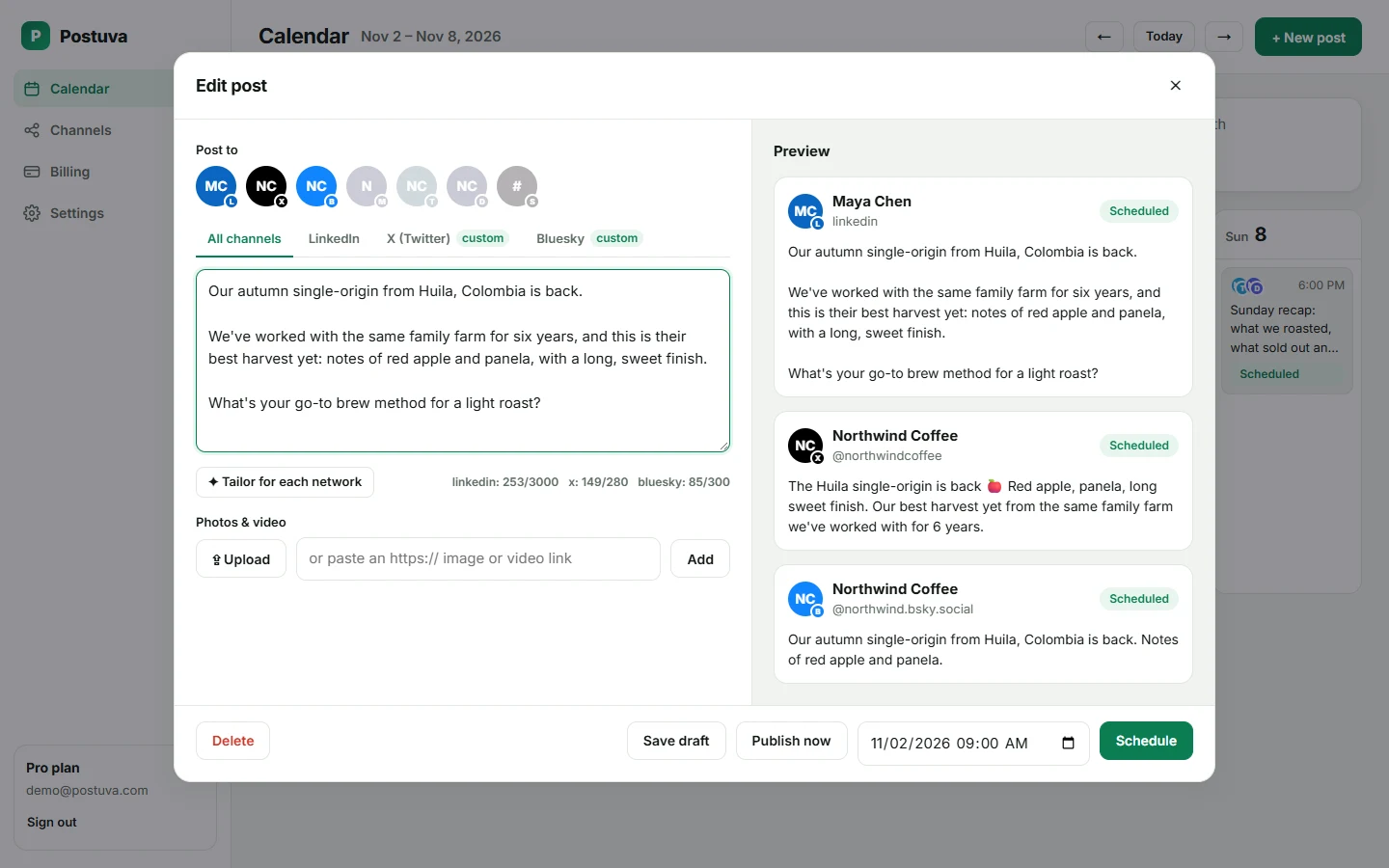
How do I schedule a LinkedIn post with Postuva?
- Create a free account. Sign up at postuva.com. No card is needed.
- Connect LinkedIn. Open Channels, choose LinkedIn and approve access with LinkedIn's official sign-in. Postuva only asks for permission to read your basic profile and publish posts.
- Write the post. Open the calendar, click New post and write your text. The counter shows how much of LinkedIn's 3,000-character limit you've used.
- Tailor it (optional). Press Tailor for each network and AI writes a LinkedIn version alongside shorter versions for X or Bluesky. Edit any of them before scheduling.
- Pick a time and schedule. Choose the date and time and press Schedule. The post appears on your calendar and goes live at that minute.
What is the best time to post on LinkedIn?
Most LinkedIn audiences are professionals who read during the working week, so weekday mornings and lunchtimes in your audience's timezone tend to work well. The honest answer is that the best time depends on who follows you.
Run a simple test: schedule the same kind of post at two different times over two weeks and compare impressions in LinkedIn's analytics. Scheduling makes this easy because the posts go out at the planned time even when you're busy.
How long should a LinkedIn post be?
LinkedIn allows 3,000 characters, but only the first two or three lines show before the “see more” link. Put the hook in those first lines. Use short paragraphs, one idea per line, and end with a question or a clear next step.
Postuva's AI rewrite follows these patterns when it turns your idea into a LinkedIn post, and it never invents facts or numbers you didn't write.
Is it safe to connect LinkedIn to a scheduler?
Yes, when the scheduler uses LinkedIn's official API. Postuva connects through LinkedIn's OAuth sign-in, so it never sees your password. The access token is encrypted with AES-256 before it's stored, and you can disconnect at any time from the Channels page or from LinkedIn's settings.
What makes a LinkedIn post perform well?
LinkedIn's feed favours posts that start conversations among people in your field. Three habits help most. First, open with a specific line that earns the click on “see more”: a surprising number, a short story, or a clear opinion. Second, write for one reader, the person you'd like to hire you or buy from you, rather than for “everyone”. Third, end with something people can answer in one sentence, so commenting feels easy.
Formatting matters as much as words. Most people read LinkedIn on their phone, so long paragraphs turn into walls of text. Keep paragraphs to one to three lines and use white space generously. Use at most three hashtags, and only ones your audience actually follows.
- Hook in the first two lines. Only those show before “see more”.
- One idea per post. Save the second idea for next week's post.
- Native text first, link second. Put the link in the post body near the end, or share it in the first comment.
- A question at the end. It gives readers an easy way in.
How many LinkedIn posts should I schedule each week?
Two or three posts a week is a sustainable rhythm for most people and small businesses, and it's enough for the algorithm to learn who engages with you. Posting every day can work for full-time creators, but quality usually drops first. A LinkedIn post keeps finding readers for a day or more, so spacing posts out avoids competing with yourself.
A simple weekly pattern: a practical tip on Tuesday, a story or lesson on Wednesday or Thursday, and a result or announcement on Friday. Schedule all three on Monday morning and spend the rest of the week replying to comments, which is where LinkedIn reach really compounds.
View as table
| Network | Posts a week |
|---|---|
| 2–3 | |
| 3–4 | |
| TikTok | 3–5 |
| 3–5 | |
| Bluesky | 5–7 |
| X (Twitter) | 7–21 |
LinkedIn post scheduler checklist
- Connected your profile with LinkedIn's official sign-in.
- The hook fits in the first two lines.
- The post is under 3,000 characters (the counter is green).
- Images are added by link and look right in the preview.
- Scheduled for a weekday morning or lunchtime in your audience's timezone.
- You have 15 minutes free after it goes live to reply to the first comments.
Frequently asked questions
Can I schedule LinkedIn posts for free?
Yes. Postuva's free plan includes 3 channels and 30 scheduled posts a month, so you can schedule LinkedIn posts free alongside two other networks.
Can I schedule posts to a LinkedIn company page?
Yes. Connect LinkedIn Pages separately; every page you administer becomes its own channel.
Can I add images to scheduled LinkedIn posts?
Yes, up to 9 images per post. They are uploaded to LinkedIn when the post is published.
What happens if a LinkedIn post fails?
Postuva retries temporary errors automatically. If LinkedIn rejects the post or your access has expired, the post is marked failed with LinkedIn's exact reason and the channel shows a Reconnect button.
How far ahead can I schedule LinkedIn posts with Postuva?
As far ahead as you like. Posts wait in the calendar until their time comes. LinkedIn's own scheduler is limited to about three months.
Do I need to reconnect LinkedIn regularly?
LinkedIn access tokens last about 60 days. When one expires, the channel shows Reconnect and your scheduled posts wait for you to sign in again; nothing is lost.