Social media content calendar template
A social media content calendar lists what you'll post, where and when. The simplest template uses 3 to 5 content pillars (such as tips, behind the scenes, customer stories and offers), assigns each to fixed days of the week, and fills each slot with an idea, the networks it goes to and a time.
The weekly content calendar template
| Day | Pillar | Example idea | Networks |
|---|---|---|---|
| Monday | Tip | One practical tip your customers can use today | LinkedIn, X |
| Tuesday | Behind the scenes | How a product is made or a day in the team | Bluesky, Telegram |
| Wednesday | Customer story | A review, case study or before and after | |
| Thursday | Conversation | A question or poll for your audience | X, Bluesky, Discord |
| Friday | Offer or news | New feature, product, event or weekly recap | All channels |
What goes into a content calendar?
| Field | Why it matters | Example |
|---|---|---|
| Date and time | When it goes live, in your audience's timezone | Tue 10:30 |
| Pillar | Keeps your mix balanced | Tip |
| Idea / copy | The post itself | “Grind finer if it tastes sour” |
| Networks | Where it goes | X, Bluesky, Mastodon |
| Visual | Image or video needed | Photo of a pour-over |
| Status | Draft, scheduled, published | Scheduled |
| Link | Where the post sends people | /guides/brewing |
How do I build my own content calendar?
- Pick 3–5 pillars. Topics your audience cares about that tie back to what you sell.
- Choose a rhythm. Decide how many posts a week you can sustain. Consistency beats volume.
- Batch ideas monthly. Brainstorm a month of ideas in one session.
- Schedule them. Put each idea on a content calendar that publishes automatically.
- Review monthly. Keep the pillars that perform and replace the ones that don't.
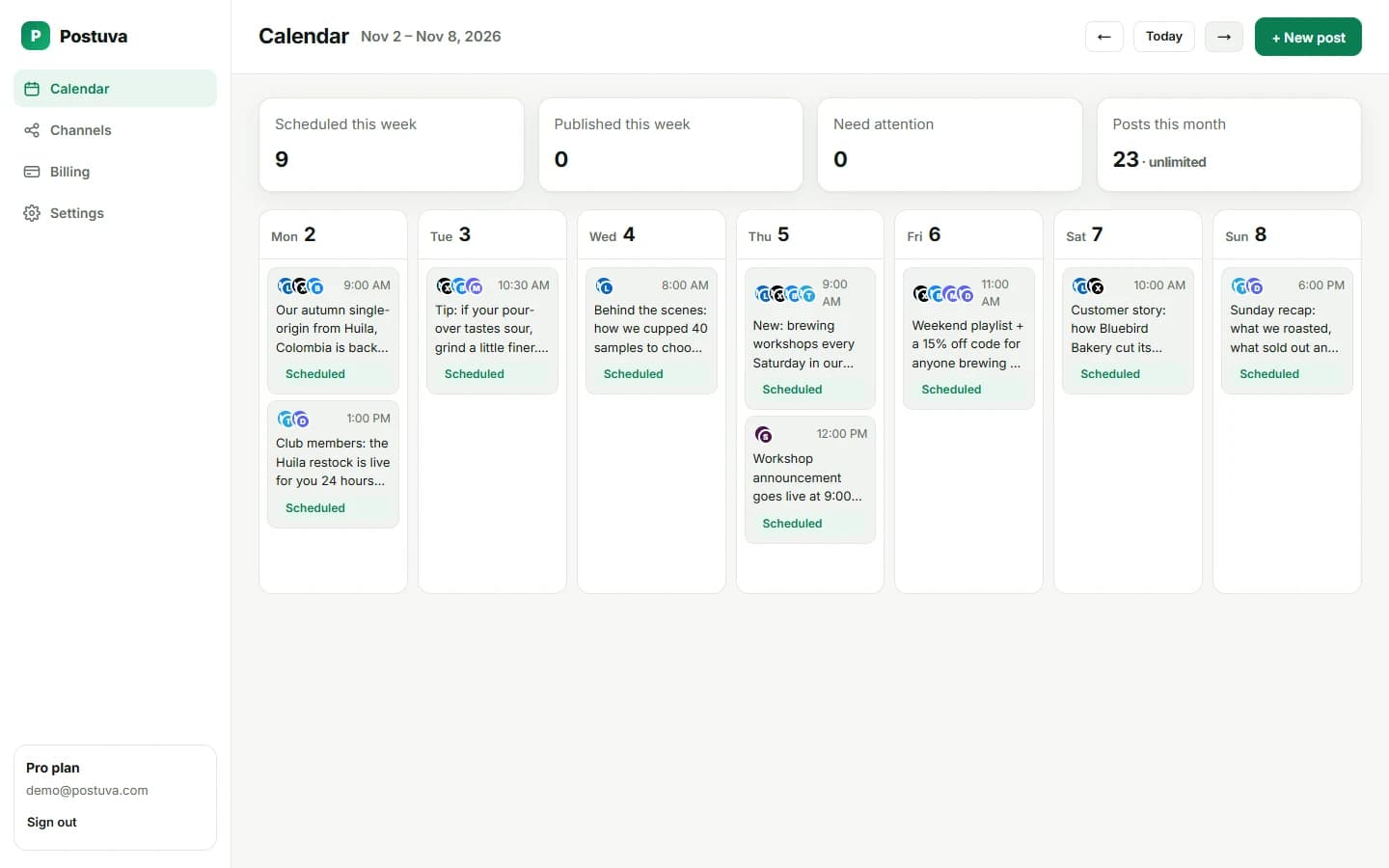
Monthly content calendar example
| Week | Theme | Key post | Supporting posts |
|---|---|---|---|
| 1 | New season | Product or service launch | Teaser, behind the scenes, FAQ |
| 2 | Education | In-depth tip or guide | Quick tips, myth-busting |
| 3 | Community | Customer story | Question, user content, thank-you |
| 4 | Results | Monthly recap or case study | Lessons, preview of next month |
From template to scheduled posts
A template on paper doesn't publish anything. Once your month is outlined, move each idea into a scheduler: write the post once, select the networks from the template's “Networks” column, tailor each version and schedule it for the planned slot. Your calendar then becomes the template, filled in, with statuses that update automatically as posts go live.
Content pillar ideas by industry
- SaaS: product tips, customer results, founder lessons, changelog, industry opinions.
- Local business: offers, team, community events, customer photos, how-tos.
- E-commerce: new arrivals, styling or usage tips, reviews, restocks, behind the scenes.
- Agencies: client results, process, team expertise, industry news, culture.
- Creators: lessons, stories, opinions, resources, community questions.
Copy-paste template
Copy this into a spreadsheet or document and fill one row per post. When the month is planned, move each row into your scheduler.
| Date | Time | Pillar | Idea | Networks | Visual | Status |
|---|---|---|---|---|---|---|
| Mon 3 | 09:00 | Tip | One mistake beginners make with… | LinkedIn, X | None | Draft |
| Wed 5 | 12:30 | Story | How we fixed… | Photo | Draft | |
| Thu 6 | 17:00 | Community | Question: which…? | X, Bluesky, Discord | None | Draft |
| Fri 7 | 10:00 | Offer | This week only… | All | Product photo | Draft |
Common content calendar mistakes
- Planning more posts than you can create; start small and add later.
- Forgetting key dates: holidays, launches, events.
- Only one pillar (usually promotions); balance it with value.
- Never reviewing results; adjust pillars monthly.
- Keeping the calendar in one person's head; share it with the team.
How many content pillars should you have?
Three to five pillars is the sweet spot. Fewer than three gets repetitive; more than five makes your feed feel unfocused and planning harder. A good set covers education (tips and how-tos), connection (stories and behind the scenes), proof (results and customer stories), and conversion (offers and announcements), plus a community pillar if you run one. Aim for roughly 80% value and 20% promotion across a month.
Content calendar for a team
When several people contribute, the calendar becomes the source of truth. Agree who owns each pillar (for example, the founder writes stories, marketing writes tips and support shares customer wins), and set a deadline: everything for next week is scheduled by Thursday. Review the week together for ten minutes on Friday.
A shared scheduler makes this easier than a spreadsheet because the calendar shows what's actually scheduled, not what someone intended to schedule. Statuses update on their own as posts go live, and anything that fails is flagged for whoever looks next.
Turning one idea into a week of posts
A single strong idea can fill several slots in your calendar. Publish the full idea as a LinkedIn post on Tuesday, a short version on X and Bluesky on Wednesday, a question about it on Thursday, and a recap with what people said on Friday. That's four posts from one idea, each adding something new, and it makes a full calendar far easier to sustain.
Frequently asked questions
How far ahead should I plan social media content?
Two to four weeks ahead works for most teams, leaving room for timely posts.
Is a spreadsheet enough?
For brainstorming, yes. A calendar that also publishes saves time and prevents missed posts.
What's the best free content calendar tool?
A spreadsheet is free and flexible for planning. Postuva's free plan adds a calendar that also publishes to 3 channels.
Should I plan content weekly or monthly?
Plan themes monthly and write posts weekly. That keeps a direction without locking in posts too early.
How do I fill a content calendar when I run out of ideas?
Answer customer questions, share lessons from your week, repurpose your best past posts and comment on news in your industry.