Schedule YouTube videos and Shorts
To schedule a YouTube video with Postuva, connect your channel with Google's sign-in, upload the video, make the first line of the post the title (up to 100 characters) and the rest the description, then pick a time. Postuva uploads it to YouTube at that minute. Vertical videos under three minutes become Shorts.
- Title
- First line of the post, up to 100 characters
- Description
- Up to 5,000 characters
- Shorts
- Vertical videos up to 3 minutes
- Connection
- Google's official sign-in
- Price
- Free for 3 channels
Why schedule YouTube videos with Postuva instead of YouTube Studio?
YouTube Studio already lets you upload a video and set it to go public later, and for long-form videos with custom thumbnails and chapters it remains the best place to finish them. Where Studio falls short is everything around the upload: it only knows about YouTube.
Most creators now cut every video into Shorts, TikToks and Reels and announce it on LinkedIn, X or a newsletter. Postuva plans all of that on one calendar. Schedule the Short on YouTube, the same clip on TikTok and Instagram, and an announcement post everywhere else, each with its own caption.
| YouTube Studio | Postuva | |
|---|---|---|
| Schedule uploads | Yes | Yes |
| Custom thumbnails, chapters, end screens | Yes | In YouTube Studio |
| Same clip to TikTok and Reels | No | Yes |
| Announce on other networks | No | Yes |
| AI title and description | Limited | Yes |
How do I schedule a YouTube video with Postuva?
- Connect YouTube. Open Channels and press Connect next to YouTube. Google's sign-in opens in a pop-up; choose the account that owns the channel.
- Upload the video. Press New post and upload the video file. MP4 with H.264 video works best; large files are uploaded in parts.
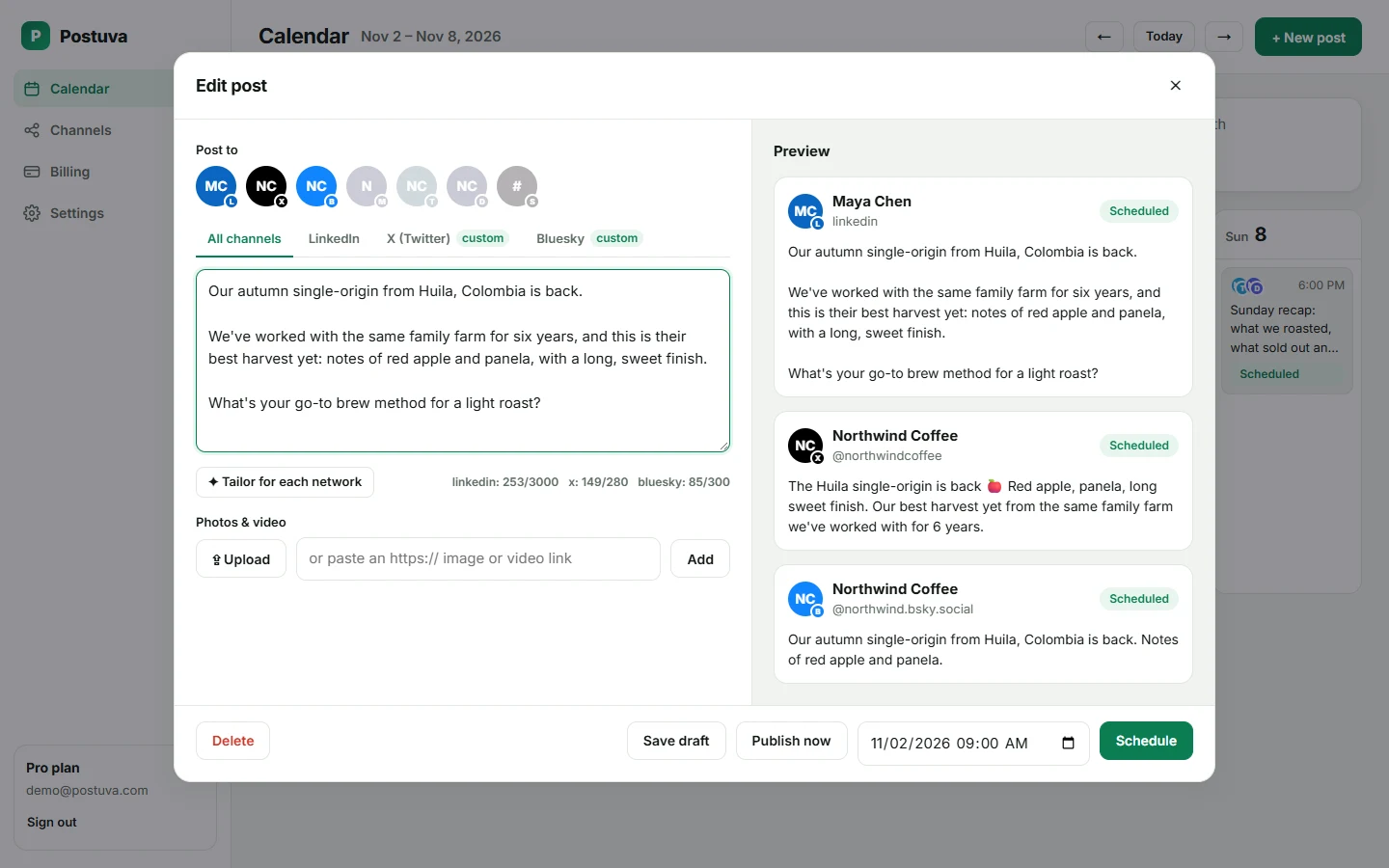
- Write the title and description. The first line becomes the title (up to 100 characters) and the rest the description. Tailor for each network can write both for you.
- Schedule. Pick the time and press Schedule. Postuva uploads the video at that minute and links to it on the calendar.
How do I schedule a YouTube Short?
There's no separate Shorts upload: YouTube treats any vertical (9:16) or square video of up to three minutes as a Short. Upload the vertical clip in Postuva the same way as a long video and YouTube places it in the Shorts feed automatically. Adding #Shorts to the title or description is optional but helps on older devices.
Shorts are where most channels now find new viewers, while long videos keep them. A common rhythm is two or three Shorts a week that point to one longer video, all scheduled from the same week on the calendar.
What makes a good YouTube title and description?
The title does most of the work in search and recommendations. Put the main keyword near the start, keep it under about 60 characters so it isn't cut off on phones, and promise one specific result. “How to descale an espresso machine in 5 minutes” beats “Machine maintenance tips”.
Use the first two lines of the description for a plain summary (they show in search results), then add links, timestamps and credits. Postuva's AI writes a draft title and description from your notes but never adds claims or numbers you didn't give it.
Will my scheduled videos be public?
Postuva uploads videos as public unless you choose otherwise. One exception comes from Google: videos uploaded through a new app are kept private until Google has verified that app. If a video shows as private in YouTube Studio, change its visibility there and it goes live straight away.
Videos uploaded through Postuva are marked as not made for kids. If your channel makes content for children, set that in YouTube Studio's defaults, which apply to every upload.
What happens if a scheduled YouTube post fails?
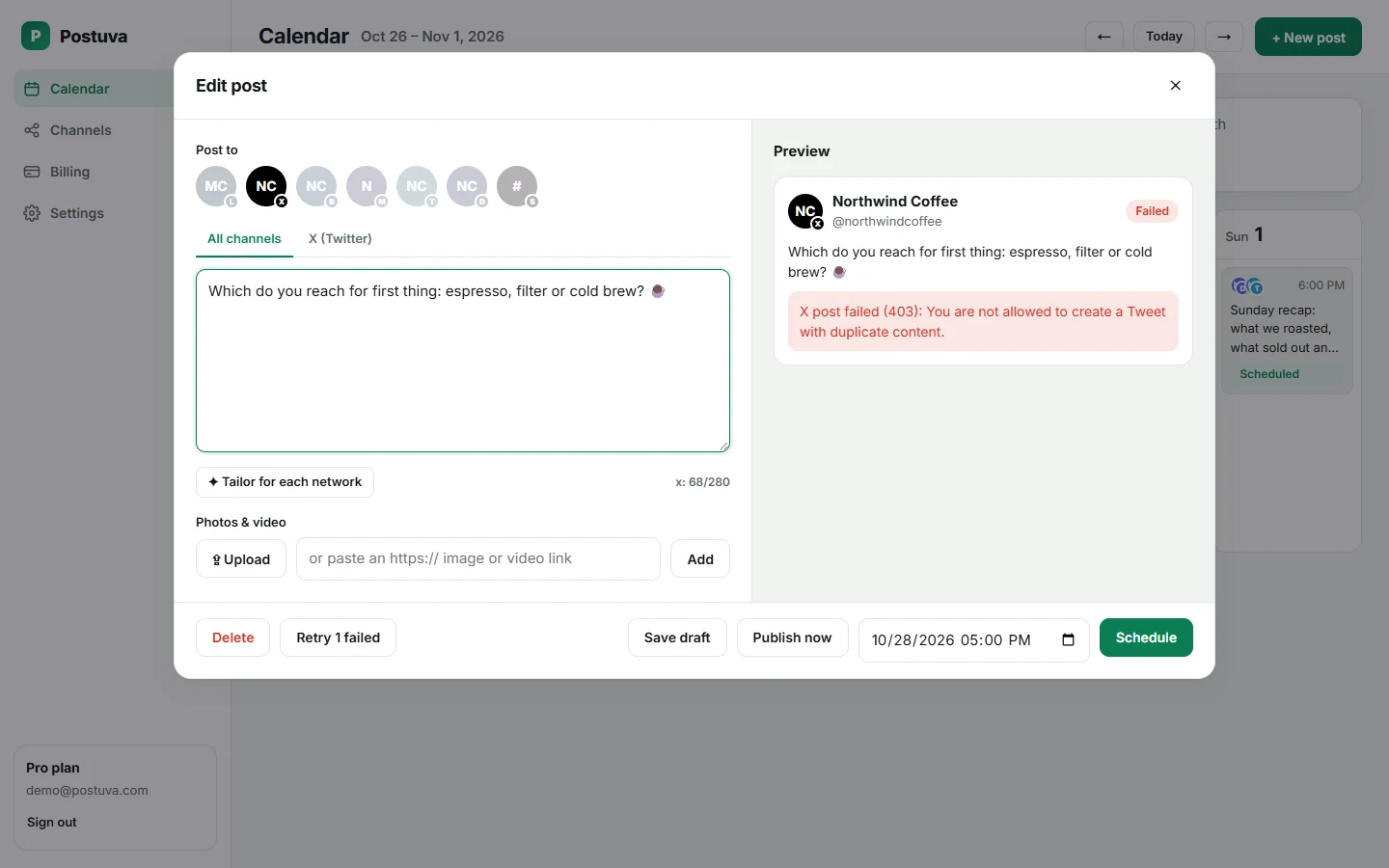
Networks refuse posts for a handful of reasons: an expired connection, media in a format they don't accept, a caption over the limit or a temporary outage on their side. Postuva handles each one differently. Temporary errors (timeouts, rate limits, the network being down) are retried automatically after one minute, five minutes and thirty minutes. Permanent errors are not retried, because sending the same broken request again only wastes time.
When a post can't be published, it turns red on the calendar and shows YouTube's exact error message, not a vague “something went wrong”. If Google's access has been revoked, the channel shows a Reconnect button. Fix the cause, press Retry and the post goes out straight away.
Is it safe to connect YouTube to Postuva?
Yes. Postuva connects through YouTube's official sign-in, which opens in a small pop-up window on YouTube's own website. You approve exactly what Postuva may do there; Postuva never sees your password. The access token YouTube returns is encrypted with AES-256-GCM before it's stored, and it's only decrypted at the moment a post is published.
You can disconnect at any time, either from Postuva's Channels page or from your Google Account's Security → Third-party connections. Disconnecting deletes the stored token immediately. Posts already published stay on YouTube; scheduled posts for that channel stop.
How much does it cost to schedule YouTube posts?
The free plan includes 3 channels, 30 scheduled posts a month and 20 AI rewrites, with no time limit and no card. That's enough to schedule YouTube alongside two other networks and see whether planning ahead works for you.
Paid plans start at $15 a month (Creator: 10 channels, unlimited posts, 300 AI rewrites). Pro at $29 adds approvals, extra workspaces and team members, and Agency at $79 covers 150 channels for client work. Yearly billing gives you two months free. Every plan includes every network, so YouTube never costs extra.
Frequently asked questions
Can I schedule YouTube videos for free?
Yes. The free plan includes 3 channels and 30 scheduled posts a month, including YouTube uploads.
Can I set a custom thumbnail?
Not yet. Postuva uses YouTube's automatic thumbnail; change it in YouTube Studio after scheduling.
How big can my video be?
Postuva uploads videos up to 500 MB. For longer, high-bitrate videos, upload directly in YouTube Studio.
Can I schedule to several YouTube channels?
Yes. Connect each channel separately; each one is its own channel in Postuva.