A Buffer alternative for teams who just want to plan and publish
Postuva is a Buffer alternative for people who want one calendar for every network, AI that rewrites each post to fit each network, and simple flat pricing with a free plan. Buffer is one of the best-known social media schedulers, known for a clean interface and per-channel pricing. Buffer may still suit you better if you rely on Buffer's own extras, such as its start page or engagement features.
- Free plan
- 3 channels, 30 posts a month
- Paid plans
- $15, $29 and $79 a month
- AI per-network rewrites
- Included in every plan
- Networks today
- 23, including Instagram, TikTok, YouTube, LinkedIn, X and Facebook
What is Buffer good at?
Buffer is one of the best-known social media schedulers, known for a clean interface and per-channel pricing.
It's fair to say Buffer does these things well:
- Simple, well-designed scheduling queue
- Long track record and a large user base
- Wide network coverage, including Instagram and TikTok
How Buffer and Postuva approach scheduling differently
Buffer popularised the queue: you add posts to a list for each channel, and Buffer publishes them in time slots you set in advance. It's a calm, simple model that suits people who post the same kinds of updates on a fixed rhythm. The trade-off is that each channel has its own queue, so writing one announcement for five networks still means visiting each one.
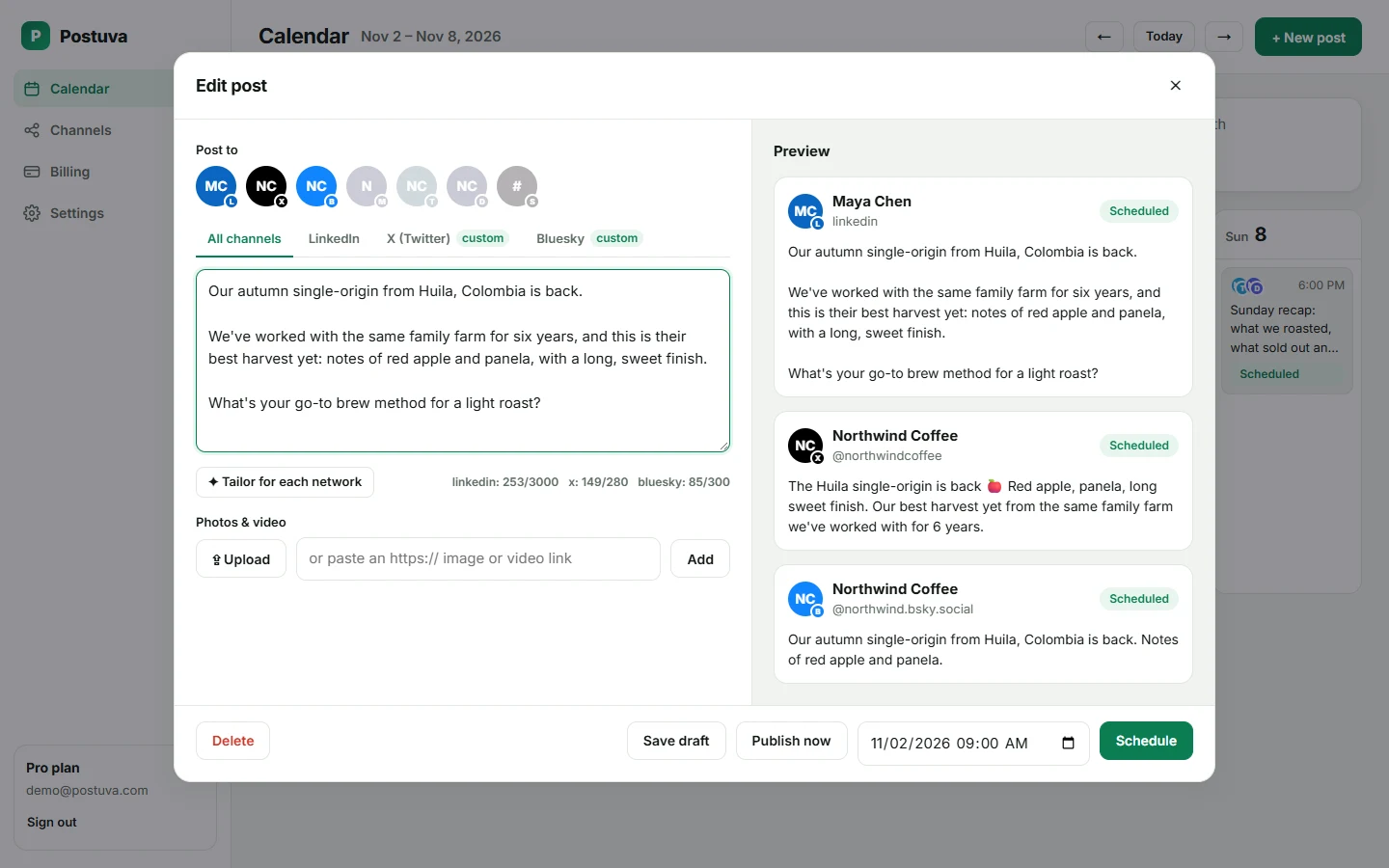
Postuva starts from the idea rather than the channel. You write once, select every network the idea should go to, and the composer holds one version per network side by side, each with its own character counter and preview. The week calendar then shows all channels together, so you plan by day and by theme rather than by queue.
Neither model is wrong. If you love a fixed-slot queue per channel, Buffer's approach will feel natural. If most of your posts go to several networks at once, an idea-first composer saves the most time.
Pricing models: per channel vs flat plans
Buffer is known for pricing that scales with the number of channels you connect, which is easy to understand and cheap for one or two accounts. As you add networks, or start managing a second brand, the total grows with every channel. Check Buffer's pricing page for current numbers.
Postuva uses flat plans: Creator includes 10 channels for $15 a month, Pro includes 30 channels and 5 teammates for $29, and Agency includes 150 channels across 25 workspaces for $79. If you post to many networks, flat plans are usually easier to budget; if you only ever post to one or two channels, the difference is small.
Why do people look for a Buffer alternative?
- Per-channel pricing adds up as you add networks
- Wanting AI that rewrites one idea for every network at once
- Wanting a week calendar of all channels on one screen
Postuva vs Buffer at a glance
| Postuva | Buffer | |
|---|---|---|
| Free plan | Yes, 3 channels | Check current plans |
| AI rewrite for each network in one click | Yes | Varies by plan |
| Week calendar of all channels | Yes | Yes |
| Failure alerts with the network's exact reason | Yes | Varies |
| Client workspaces | Up to 25 on Agency | Varies by plan |
| Instagram, TikTok, Facebook, YouTube | Yes | Yes |
What does Postuva do differently from Buffer?
Postuva is deliberately focused: write once, let AI adapt the idea for each network, see the week at a glance, and trust that posts go out at the minute you picked. See pricing or the features overview.
- Flat plans: 10 channels for $15/month on Creator
- AI tailoring for every selected network in one click
- Exact failure reasons and automatic retries
When should you stay with Buffer?
Switching tools has a cost, so be honest about fit. Stay with Buffer if:
- You rely on Buffer's own extras, such as its start page or engagement features
- Your team is settled into Buffer's queue-based workflow
How do I switch from Buffer to Postuva?
- Create a free account. Sign up in under a minute; no card required.
- Connect your channels. Connect the same networks you use today from the Channels page.
- Recreate upcoming posts. Copy your next week of scheduled posts from Buffer into the Postuva calendar, then pause them in Buffer.
- Run both for a week. Keep both tools for a week until you're confident, then cancel the one you no longer need.
How to evaluate a Buffer alternative in one afternoon
- List your must-haves. Write down the networks you post to, how many accounts, who needs access and the one feature you can't live without.
- Run the same week in both tools. Take next week's real posts and schedule them in the new tool too (paused in one of them), so you compare real work, not demos.
- Check the failure path. Disconnect one account on purpose and see how each tool tells you. Silent failures are the most expensive problem a scheduler can have.
- Price it for next year. Add the channels and teammates you expect to have in twelve months and compare the totals.
What a switch to Postuva looks like
Everything happens in one composer and one calendar. You pick the channels, write the idea once, let AI tailor each network's version, and schedule. The recording below is a real, unedited session in the app.
Frequently asked questions
Is Postuva cheaper than Buffer?
Postuva has a free plan and paid plans of $15, $29 and $79 a month with flat channel limits. Compare with Buffer's current pricing for the number of channels and users you need.
Can Postuva import my posts from Buffer?
Not automatically yet. Most people recreate the next week of posts, which takes a few minutes.
Which networks does Postuva support?
X, LinkedIn, Facebook, Instagram, Threads, TikTok, YouTube, Pinterest, Reddit, Tumblr, Bluesky, Mastodon, Nostr, Lemmy, Telegram, Discord, Slack, WordPress, DEV, Hashnode, Google Business Profile and Listmonk, plus LinkedIn company pages. More networks are added regularly.