Schedule Bluesky posts in advance
Bluesky's official app has no built-in post scheduling, so you need a scheduler. Postuva connects with a Bluesky app password, never your main password, and publishes posts of up to 300 characters with clickable links, hashtags and up to 4 images at the exact time you pick.
- Character limit
- 300 per post
- Images
- Up to 4 per post
- Connection
- Bluesky app password
- Native Bluesky scheduling
- Not available in the official app
- Links and hashtags
- Made clickable automatically
Does Bluesky have a scheduling feature?
Not in the official app at the time of writing. Bluesky's API supports posting from tools, which is how schedulers like Postuva publish on your behalf.
What do you see when connecting Bluesky?
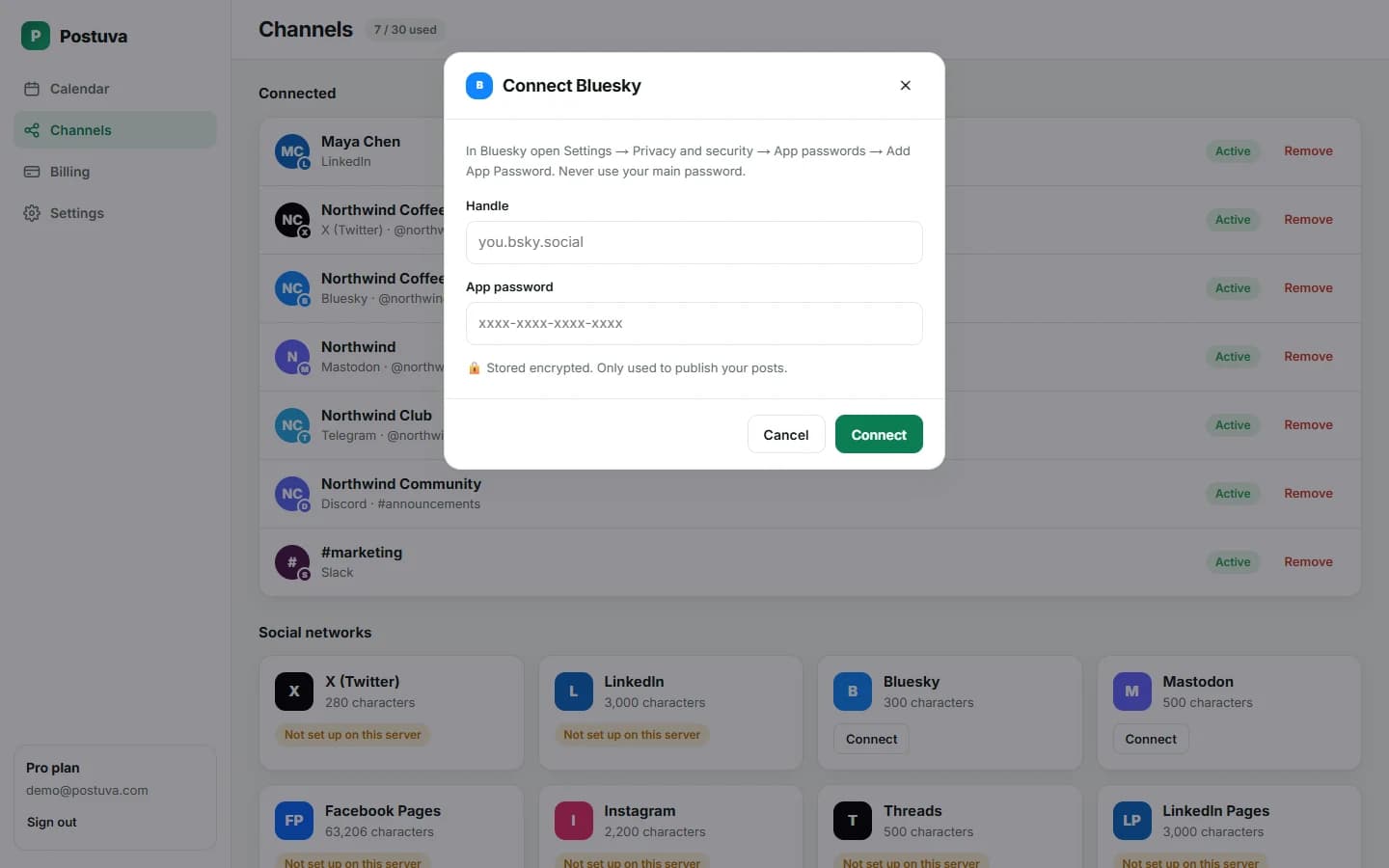
The connect dialog asks for two things, your handle and an app password, and shows where to create the password in Bluesky's settings. Postuva signs in once to confirm the details work and loads your display name and avatar, so the channel looks familiar in the composer.
How do I schedule a Bluesky post?
- Create an app password. In Bluesky open Settings → Privacy and security → App passwords → Add App Password. Give it a name like “Postuva” and copy it.
- Connect Bluesky. In Postuva open Channels → Bluesky, enter your handle and the app password.
- Write and schedule. Write the post, stay under 300 characters, add images if you like, pick a time and press Schedule.
Why use an app password instead of my Bluesky password?
An app password can post for you but can't change your account settings, and you can revoke it at any time without changing your real password. Postuva also encrypts it with AES-256 before saving it.
Will links and hashtags work in scheduled Bluesky posts?
Yes. Bluesky stores links and hashtags as “facets” attached to the text rather than detecting them automatically. Postuva adds those facets when it publishes, so links and hashtags are clickable exactly as if you'd posted from the app.
Cross-posting from X to Bluesky
Many people now post the same update on X and Bluesky. With Postuva you select both channels on one post; the 280-character X limit and the 300-character Bluesky limit are checked separately, and you can give each network its own text if you want.
How do you grow on Bluesky?
Bluesky rewards people who show up and talk. Its following feed is chronological, and custom feeds built around topics (science, design, books, local news) help new posts find interested readers. Posting consistently, joining topic feeds with the right hashtags, and replying to others gets you discovered faster than broadcasting announcements.
Because Bluesky has no built-in scheduler, consistency is where scheduling earns its keep. Plan a few posts across the week, keep them conversational, and spend your live time replying.
- Write conversationally. Questions and opinions travel further than announcements.
- Use hashtags that topic feeds follow, for example #booksky or #devsky.
- Add alt text to images; many people in the community expect it.
- Keep each post under 300 characters (the counter shows when you're close).
Bluesky posting limits compared with other networks
Bluesky's 300-character limit is a little more generous than X's 280, and much shorter than Mastodon's default 500 or LinkedIn's 3,000. If you cross-post, the shortest limit you select decides how long a single shared version can be. Postuva checks every selected network separately, so you'll see which version needs trimming.
View as table
| Network | Characters |
|---|---|
| X (Twitter) | 280 |
| Bluesky | 300 |
| Threads | 500 |
| Mastodon | 500 |
| 600 | |
| Google Business Profile | 1,500 |
| Discord | 2,000 |
| 2,200 | |
| TikTok | 2,200 |
| 3,000 | |
| Telegram | 4,096 |
Is it safe to schedule Bluesky posts with a third-party tool?
Yes, when the tool uses an app password. App passwords exist precisely so that tools can post for you without your main password. They can't change your email or password, and you can revoke one at any time from the same settings page without affecting anything else. Postuva encrypts the app password before saving it and only uses it to publish your scheduled posts.
Worked example: a week on Bluesky
Write all five on Monday morning, schedule them at the times your followers are active, and spend a few minutes each day replying. That rhythm beats posting ten times on one day and disappearing for a week.
| Day | Post | Why it works |
|---|---|---|
| Monday | A question about a common problem in your field | Invites replies from people who follow the topic |
| Tuesday | A short tip with one image and alt text | Useful, easy to repost |
| Wednesday | A link to something you made, with your one-line take | Context makes people click |
| Thursday | Behind the scenes of your week | Personal posts fit Bluesky's culture |
| Friday | A recap or a thank-you to people who helped | Builds relationships |
Frequently asked questions
Is scheduling Bluesky posts free?
Yes, Bluesky is included in the free plan.
Can I schedule to several Bluesky accounts?
Yes, connect each one with its own app password.
Does it work with custom domain handles?
Yes. Enter your handle, for example you.com, when connecting.
Can I schedule Bluesky threads?
Single posts today; threads are planned.
What happens if I revoke the app password?
Scheduled Bluesky posts fail with an authentication error and the channel shows Reconnect. Create a new app password and reconnect to resume.
Can I add alt text to Bluesky images?
Yes, the image's description is sent along with it when the post is published.
Can I schedule Bluesky posts for free?
Yes. Bluesky is one of the networks included in Postuva's free plan, which covers 3 channels and 30 scheduled posts a month.
Why are my links not clickable when I post to Bluesky from other tools?
Bluesky needs links to be marked up separately from the text (as facets). Tools that don't add them publish plain text. Postuva adds link and hashtag facets automatically.
Can I post the same text to X and Bluesky?
Yes. Select both channels. If the text fits 280 characters it works on both; otherwise give X a shorter version in its own tab.