Schedule X (Twitter) posts in advance
Postuva schedules posts to X (formerly Twitter) through X's official API. Connect your account, write a post of up to 280 characters with up to 4 images, choose a time and press Schedule. The same idea can go to LinkedIn, Bluesky and other networks at the same time, each in its own format.
- Character limit
- 280 (standard accounts)
- Images
- Up to 4 per post
- Connection
- Official X sign-in (OAuth 2.0)
- Native X scheduling
- Yes, on the web composer, one post at a time
- Price
- Free for 3 channels
Can you schedule tweets on X without a third-party tool?
Yes. On x.com the post composer has a calendar icon that schedules a single post. It doesn't work from every app, it handles one network only, and it has no view of what else you've planned.
Postuva is built for people who post the same message on several networks: you see X next to LinkedIn and Bluesky on one weekly calendar, and AI shortens a long idea to fit 280 characters without losing the point.
How does Postuva fit a long idea into an X post?
When you click Tailor for each network, the AI writes a short, punchy X version from your idea and checks it against the 280-character limit. Facts, links and numbers come only from what you wrote. The composer then shows the X version in its own tab with a live counter, so you can edit it like any other text before scheduling.
- LinkedInStory + question, ~1,200 chars
- X (Twitter)Punchy hook, ≤ 280 chars
- BlueskyConversational, ≤ 300 chars
- MastodonFriendly, alt text on images
- TelegramAnnouncement + photo album
- DiscordCommunity update + @mention
How do I schedule a post on X with Postuva?
- Connect X. In Channels, choose X (Twitter) and approve access on x.com. Postuva requests permission to read your profile, write posts and upload media.
- Write the post. Click New post in the calendar. The counter turns red if the X version goes over 280 characters.
- Add images. Attach up to 4 images by link. They're uploaded to X when the post goes out.
- Schedule. Pick the date and time and press Schedule, or Publish now to post immediately.
How do I fit a long idea into 280 characters?
Lead with the single most useful sentence, cut filler words, and move details to a link. If you also post the idea to LinkedIn, keep the long version there and give X the punchy version.
That's exactly what Tailor for each network does: you write once, and AI produces a 280-character X post and a fuller LinkedIn post from the same idea. You review and edit both before anything is scheduled.
Why do scheduled posts on X sometimes fail?
Postuva shows the exact reason X gave on the failed post, so you know which of these happened instead of guessing.
- The account's access was revoked or expired: reconnect the channel.
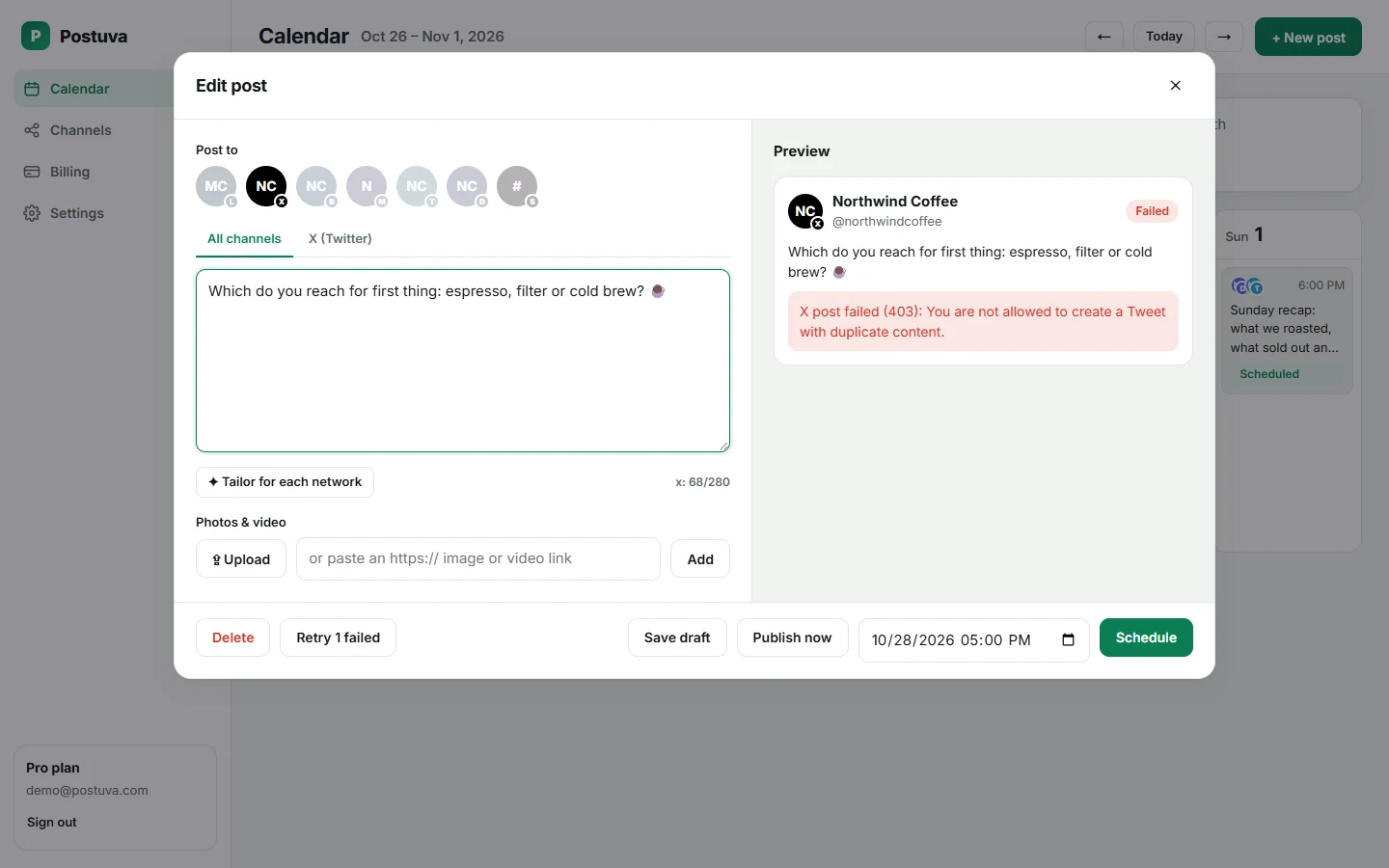
- The post is a duplicate of a recent post: X rejects identical text posted again.
- The post is longer than 280 characters on a standard account.
- X is rate limiting the account: Postuva retries automatically after a delay.
What makes a good post on X?
X is fast. Most of a post's engagement happens in the first few hours, and readers decide in a second whether to stop scrolling. The posts that travel furthest are specific: one clear claim, a number, a short lesson or a strong opinion, written in plain words. Threads work for deeper explanations, but a single strong post published consistently beats an occasional long thread.
Images help a post stand out in the feed, and they don't count against your character limit. Links count as 23 characters each however long they are, so you never need a link shortener.
- Lead with the most interesting sentence. Don't warm up.
- Write like you speak, with no corporate tone.
- Use one or two hashtags at most, or none.
- Reply to replies in the first hour after posting.
How often should you post on X?
Because posts on X fade within hours, accounts that grow usually post at least once a day and often two or three times. That's far more than most people can write on the spot, which is why scheduling matters here more than on any other network. Batch a week of posts on Monday, spread them across mornings and early afternoons, and keep your live time for conversations.
Don't schedule the same text twice: X rejects duplicate posts. Postuva shows that exact error on the post if it happens, so you can reword it and retry in one click.
X vs Bluesky: should you post the same thing on both?
Many audiences now follow people on both networks, and posting the same idea on both is normal. The limits are close (280 vs 300 characters), so one short version often works for both. Bluesky's culture tends to be more conversational and less promotional, so a gentler wording sometimes performs better there. Select both channels on one post and give Bluesky its own text only if you want to.
Frequently asked questions
Is Postuva's X scheduler free?
Yes, on the free plan with up to 3 channels and 30 scheduled posts a month.
Can I schedule threads on X?
Single posts are supported today. Threads are on the roadmap.
Does scheduling hurt reach on X?
There's no public evidence that posts published through the official API are treated differently from posts made in the app. Timing and content matter far more.
Can I schedule posts to more than one X account?
Yes. Connect each account as its own channel and pick which ones a post goes to.
Do links count toward the 280 characters?
Yes, every link counts as 23 characters on X, whatever its real length.
Can Postuva post to X Premium's longer posts?
The composer currently enforces the standard 280-character limit for every account.
Can I schedule X posts for free?
Yes. X is included in Postuva's free plan with 3 channels and 30 scheduled posts a month.