A Hypefury alternative for teams who just want to plan and publish
Postuva is a Hypefury alternative for people who want one calendar for every network, AI that rewrites each post to fit each network, and simple flat pricing with a free plan. Hypefury is a scheduling and growth tool for creators who write their own posts, with features such as auto-plugs, Instagram auto-DMs and an engagement builder. It supports Bluesky, Threads, LinkedIn, Instagram and TikTok, and says it no longer supports X. Hypefury may still suit you better if growth automations like auto-plugs and auto-DMs drive your results.
- Free plan
- 3 channels, 30 posts a month
- Paid plans
- $15, $29 and $79 a month
- AI per-network rewrites
- Included in every plan
- Networks today
- 23, including Instagram, TikTok, YouTube, LinkedIn, X and Facebook
What is Hypefury good at?
Hypefury is a scheduling and growth tool for creators who write their own posts, with features such as auto-plugs, Instagram auto-DMs and an engagement builder. It supports Bluesky, Threads, LinkedIn, Instagram and TikTok, and says it no longer supports X.
It's fair to say Hypefury does these things well:
- Growth automations such as auto-plugs and Instagram auto-DMs
- A distraction-free editor for writers
- A low entry price per channel
What changed for X creators
Hypefury grew up as a growth tool for X: thread scheduling, auto-plugs that add a call to action when a post takes off, evergreen reposting and an engagement builder. Its site now says it no longer supports X, and it focuses on Bluesky, Threads, LinkedIn, Instagram and TikTok, with features such as Instagram auto-DMs and turning text posts into images.
If X is still an important channel for you, that's the main reason to look elsewhere. Postuva publishes to X through the official API, alongside 22 other networks, and AI tailors each version so your X post gets a sharp first line while LinkedIn gets the longer story.
Postuva doesn't have Hypefury's growth automations, such as auto-plugs or auto-DMs. It's a writing and scheduling tool, not an engagement automation tool.
Moving your writing routine to Postuva
- Connect X and your other networks. X and LinkedIn connect through their official sign-in; Bluesky uses an app password.
- Write in batches. Draft a week of posts in one sitting and let AI tailor each one for every network.
- Fill the calendar. Spread posts across the week and check the calendar shows a steady rhythm on each network.
Why do people look for a Hypefury alternative?
- Needing to post to X, which Hypefury no longer supports
- Posting to more networks, like Facebook, YouTube, Mastodon or Discord
- Wanting AI to tailor each network's version
Postuva vs Hypefury at a glance
| Postuva | Hypefury | |
|---|---|---|
| X (Twitter) | Yes | No longer supported |
| Networks | 23 | 5 |
| Growth automations (auto-plugs, auto-DMs) | No | Yes |
| AI rewrite for each network in one click | Yes | Check current features |
| Free plan | Yes, 3 channels | 7-day trial |
| Paid plans from | $15 a month for 10 channels | $6 per channel, or $19 for all |
What does Postuva do differently from Hypefury?
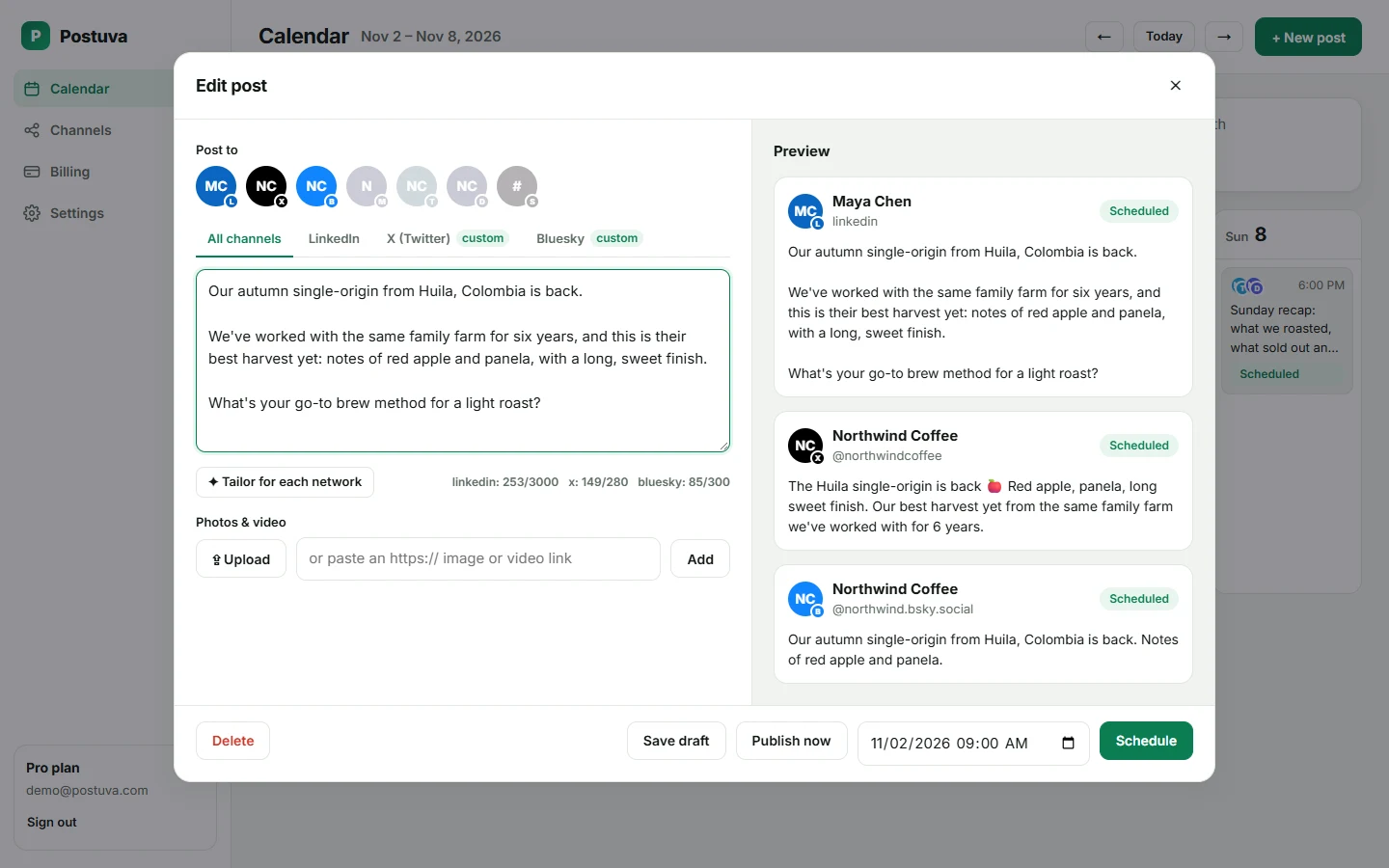
Postuva is deliberately focused: write once, let AI adapt the idea for each network, see the week at a glance, and trust that posts go out at the minute you picked. See pricing or the features overview.
- X plus 22 other networks
- AI tailoring for each network
- A free plan with 3 channels
When should you stay with Hypefury?
Switching tools has a cost, so be honest about fit. Stay with Hypefury if:
- Growth automations like auto-plugs and auto-DMs drive your results
- You only post to the networks Hypefury supports
How do I switch from Hypefury to Postuva?
- Create a free account. Sign up in under a minute; no card required.
- Connect your channels. Connect the same networks you use today from the Channels page.
- Recreate upcoming posts. Copy your next week of scheduled posts from Hypefury into the Postuva calendar, then pause them in Hypefury.
- Run both for a week. Keep both tools for a week until you're confident, then cancel the one you no longer need.
How to evaluate a Hypefury alternative in one afternoon
- List your must-haves. Write down the networks you post to, how many accounts, who needs access and the one feature you can't live without.
- Run the same week in both tools. Take next week's real posts and schedule them in the new tool too (paused in one of them), so you compare real work, not demos.
- Check the failure path. Disconnect one account on purpose and see how each tool tells you. Silent failures are the most expensive problem a scheduler can have.
- Price it for next year. Add the channels and teammates you expect to have in twelve months and compare the totals.
What a switch to Postuva looks like
Everything happens in one composer and one calendar. You pick the channels, write the idea once, let AI tailor each network's version, and schedule. The recording below is a real, unedited session in the app.
Frequently asked questions
Is Postuva cheaper than Hypefury?
Postuva has a free plan and paid plans of $15, $29 and $79 a month with flat channel limits. Compare with Hypefury's current pricing for the number of channels and users you need.
Can Postuva import my posts from Hypefury?
Not automatically yet. Most people recreate the next week of posts, which takes a few minutes.
Which networks does Postuva support?
X, LinkedIn, Facebook, Instagram, Threads, TikTok, YouTube, Pinterest, Reddit, Tumblr, Bluesky, Mastodon, Nostr, Lemmy, Telegram, Discord, Slack, WordPress, DEV, Hashnode, Google Business Profile and Listmonk, plus LinkedIn company pages. More networks are added regularly.